Categories
Uncategorized

From Gut Feeling to Data-Driven: How SMEs Are Winning with Business Intelligence

Introduction: The Gut vs. Data Showdown

Your gut has gotten you this far. You’ve made hundreds of decisions hiring calls, pricing moves, market expansions mostly based on intuition, experience, and what “feels right.”

But as your business scales, gut decisions stop working.

According to Salesforce’s Small Business Intelligence Report 2025, 68% of SME owners still rely primarily on intuition for major business decisions, yet those same businesses are growing only half as fast as data-driven peers.

The disconnect is stark: founders know they should be data-driven, but they lack the tools, expertise, or time to actually do it. Result? They stay in the gut-feeling trap while competitors with better data infrastructure eat their lunch.

The good news? Business intelligence is no longer exclusive to enterprises. Modern tools make BI accessible to SMEs without requiring data science degrees or six-figure implementations.

In this guide, we’ll explore why intuition fails as you scale, how data-driven SMEs are winning, and how to make the transition from gut feeling to confident, data-informed decisions.

Why Gut Feelings Work… Until They Don’t

The Founder’s Intuition Advantage (Early Stage)

In year 1-2, gut feelings often outperform data analysis:

  • You know your first 50 customers personally
  • You see market feedback instantly
  • You can quickly iterate based on direct observation
  • Speed matters more than precision

Example: A founder decides to launch a new product based on customer conversations and market feeling. With only 2-3 months of historical data, gut intuition might be more predictive than analysis.

The Scaling Problem

But as you grow to 50 customers, 500 customers, 5,000 customers:

  • You can no longer know every customer personally
  • Feedback becomes diluted and complex
  • Product decisions affect different segments differently
  • Speed must be matched with accuracy

At scale, gut feeling doesn’t scale.

The Specific Failures

Failure 1: Selection Bias
Your gut remembers the vocal customers (often not representative) and forgets the silent majority. You make decisions optimizing for the 10% of customers who complain, missing the 90% who quietly churn.

Failure 2: Confirmation Bias
Once you form a hypothesis, your brain seeks evidence supporting it and ignores contradictory data. “Pricing is the problem” becomes self-reinforcing, even if the real issue is product quality.

Failure 3: Recency Bias
Recent events disproportionately influence perception. A bad week can trigger panic decisions, a good week can mask underlying problems.

Failure 4: Survivorship Bias
You see your successes but forget your failures. “We grew by hiring fast” might actually mean “we got lucky our hiring worked out, but we made terrible hiring calls we’ve forgotten about.”

Failure 5: Base Rate Neglect
You ignore statistical probability. “This expansion will work because I have a good feeling” ignores that 60% of retail expansions fail in year 1.
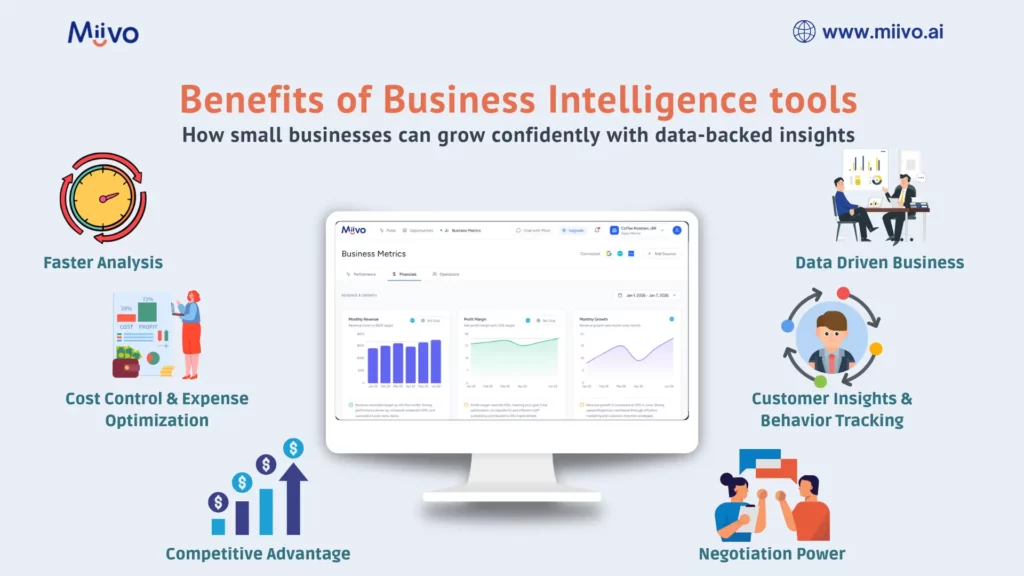
benefits of business intelligence for SMEs

How Data-Driven SMEs Are Winning

The Competitive Advantage

Businesses that embrace data-driven decision-making gain:

1. Speed + Accuracy
Data-driven businesses identify problems 3-4x faster than gut-feel businesses (days vs. weeks). But they also reduce costly mistakes by validating hypotheses before large investments.

2. Resource Allocation Precision
Instead of spreading resources equally across initiatives, data-driven businesses concentrate resources on highest-ROI bets. Result: 30-40% better outcome from same total spend.

3. Predictability
Gut-feel businesses have lumpy, unpredictable growth (boom-bust cycles). Data-driven businesses identify patterns and scale consistently. Investors prefer predictability by 5-10x.

4. Talent Leverage
Data creates accountability and clarity. Team members understand “why” decisions are made, increasing buy-in and execution quality. Also attracts better talent (people want to work in evidence-based organizations).

5. Negotiating Power
“This is how our customers behave” backed by data is infinitely more powerful than gut feeling when negotiating with investors, partners, or suppliers.

Real-World Example: The Pricing Decision

Gut-Feel Approach:

  • CEO feels the market will pay 15% more
  • Raises prices
  • Watches customers churn, panics, reverts prices
  • Net result: Lost time, damaged pricing power, confused market

Data-Driven Approach:

  • Analyze price elasticity using historical data
  • Model customer churn risk at 5%, 10%, 15% price increases
  • Run A/B test with small customer segment at new price
  • Analyze LTV impact of price increase vs. churn risk
  • Implement price increase only on customer segments where elasticity supports it
  • Result: 8% price increase, <3% churn, 12% revenue increase

Both took 4-6 weeks. The data-driven approach added 2 weeks of analysis but avoided the costly mistake and achieved better results.

The Business Intelligence Transformation: From Complexity to Clarity

What Business Intelligence Actually Is (Not)

Common misconception: BI requires teams of data scientists building complex models.

Reality: BI is just connecting your data, identifying patterns, and surfacing actionable insights.

Modern BI tools do this with minimal human intervention:

  1. Connect data sources (accounting, CRM, website analytics, payment processors)
  2. Auto-calculate metrics (revenue trends, customer metrics, profitability)
  3. Surface anomalies (when something looks unusual)
  4. Recommend actions (here’s what probably caused this and what to do about it)

How Accessible BI Changes Decision-Making

Before BI:

  • “Is our pricing working?” → Requires manual analysis, 3-5 business days, 8-12 hours of work
  • “Which marketing channel is most efficient?” → Guesswork, spreadsheets, debates in meetings
  • “Are we still on track for Q4 revenue?” → Wait until month-end, calculate, by then it’s too late to adjust

After BI:

  • “Is our pricing working?” → Dashboard shows price elasticity vs. benchmark, 60-second answer, data-backed confidence
  • “Which marketing channel is most efficient?” → Real-time dashboard by channel showing CAC, LTV, ROAS. Answer: <1 minute
  • “Are we on track for Q4?” → Real-time forecast built in, trending 12% above budget, confidence interval 8-15%

The Specific Tools & What They Enable

Real-Time Dashboards enable:

  • Daily operational visibility (no waiting for month-end)
  • Faster problem detection (catch issues when still small)
  • Faster decision-making (act before windows close)

Automated Reporting enables:

  • 80% less time spent on manual consolidation
  • 10-15 hours/week freed up for strategy instead of data entry
  • Higher accuracy (no manual errors)

Predictive Analytics enables:

  • Forecasting revenue, churn, cash needs 3-6 months ahead
  • Scenario modeling (what if we hire 2 people? Raise prices 10%? Enter new market?)
  • Risk identification before problems emerge

Benchmarking enables:

  • Comparing metrics against industry peers (are we ahead or behind?)
  • Identifying underperformance (this channel’s CAC is 3x industry average why?)
  • Learning from others’ playbooks

5 Ways Data-Driven SMEs Make Better Decisions Than Gut-Feel Competitors

1. Pricing Decisions: Elasticity Instead of Feelings

Gut approach: “Customers will pay 10% more. Let’s test it.”
Data approach: Test with 10% of customer base, measure churn elasticity, model revenue impact, then scale to full base only if models confirm.

Outcome: Data-driven approach increases successful price increases by 300% (80% success rate vs. 20%).

2. Customer Acquisition: Efficient Spend Instead of Spray-and-Pray

Gut approach: “Social media and Google Ads seem good. Let’s split the budget equally.”
Data approach: Track CAC, LTV, and ROAS by channel monthly. Reallocate budget 80/20 to top channel, test new channels with 5% allocation.

Outcome: 25-40% better CAC efficiency through continuous optimization.

3. Product Decisions: Data-Backed Roadmap Instead of Vanity Features

Gut approach: “Build feature X because 2-3 customers asked for it.”
Data approach: Track feature requests by frequency, analyze customer segment size, estimate revenue impact, prioritize based on ROI.

Outcome: 50% fewer wasted development hours on low-impact features.

4. Hiring Decisions: Evidence-Based Scaling Instead of Gut-Feel Timing

Gut approach: “We’re growing fast, let’s hire aggressively.”
Data approach: Analyze revenue per employee, calculate labor cost %, model impact of additional hires on margin and runway.

Outcome: Fewer hiring mistakes, better unit economics, 30% higher productivity per employee.

5. Market Expansion: Risk-Assessed Strategy Instead of YOLO Moves

Gut approach: “The opportunity looks good, let’s go for it.”
Data approach: Model expansion costs, analyze comparable market performance, stress-test assumptions, identify break-even requirements.

Outcome: 60%+ success rate on expansions (vs. 30-40% for gut-feel approach).

The Business Impact: How SMEs Grow Faster with Data-Driven Decisions

Growth Acceleration Metrics

SMEs relying on gut feel:

  • Average growth: 8-12% YoY
  • Decision speed: 2-4 weeks
  • Strategic pivots per year: 1-3
  • Mistake recovery time: 8-12 weeks

SMEs using data-driven approach:

  • Average growth: 18-28% YoY (2-3x faster)
  • Decision speed: 3-5 days (4-7x faster)
  • Strategic pivots per year: 8-16 (5-10x more experimentation)
  • Mistake recovery time: 1-2 weeks (4-6x faster)

The Compounding Effect

Over 3 years, this compounds:

  • Growth: 8% YoY vs. 20% YoY = 160% vs. 728% cumulative growth
  • Decisions: 4 strategic pivots vs. 24 strategic pivots = 6x more experiments, 10x more learning
  • Mistakes: Recover in 10 weeks vs. 2 weeks = Save 8 weeks × 2-3 mistakes/year = 16-24 weeks avoided downtime

Net result: Data-driven SMEs are 3-4x larger after 3 years, with stronger unit economics, better team culture, and investor appeal.

The Transition: From Gut Feel to Data-Driven

Step 1: Identify Your Critical Questions (Week 1)

What decisions do you make most frequently and with highest consequence?

  • Pricing adjustments
  • Marketing spend allocation
  • Hiring decisions
  • Geographic expansion
  • Product roadmap prioritization
  • Cost reduction

Pick the 3-5 most impactful.

Step 2: Define Your Key Metrics (Week 1-2)

For each decision type, what metrics would give you confidence?

  • Pricing: Price elasticity, LTV by price point, CAC by channel
  • Marketing: CAC, ROAS, LTV by channel, conversion rate
  • Hiring: Revenue per employee, labor cost %, CAC per sales hire
  • Expansion: Revenue potential, comp analysis, break-even requirements
  • Product: Feature request frequency, customer segment impact, revenue uplift

These metrics form the backbone of confident decision-making across pricing, marketing, hiring, and expansion.
To simplify this further, we’ve distilled the most critical ones into a daily checklist in 5 Financial Metrics Every Multi-Channel Business Owner Should Track Daily especially useful if you’re managing more than one revenue stream.

Step 3: Connect Your Data Sources (Week 2-3)

  • Accounting software (QuickBooks, Xero)
  • Payment processors (Stripe, Square)
  • CRM (Salesforce, HubSpot, Pipedrive)
  • Analytics (Google Analytics, Mixpanel)
  • Operational data (if applicable)

Step 4: Build Your Dashboard (Week 3-4)

Pre-built templates exist for:

  • SaaS metrics
  • Retail metrics
  • E-commerce metrics
  • Service business metrics

Start with template, customize to your needs.

Step 5: Set Decision Rules (Week 4)

“If [metric] drops below [threshold], we take action [X]”

Examples:

  • “If CAC increases >20%, we pause that channel and shift budget to top performer”
  • “If gross margin drops below 40%, we implement pricing increase or COGS reduction plan”
  • “If cash runway falls below 6 months, we begin cost reduction or capital raise process”

Step 6: Execute Decisions Based on Data (Ongoing)

Review dashboard 1-2x weekly. Act on signals.

Step 7: Track Outcomes & Learn (Ongoing)

Compare predicted outcomes to actual results. Refine models. Improve decision-making.

Common Obstacles & How to Overcome Them

Obstacle 1: “I Don’t Trust the Data”

Reality: Your data might have quality issues (wrong categorizations, missing fields), but that’s a data quality problem, not a reason to ignore data.

Solution: Audit data quality once, clean it up, trust the trends (exact numbers matter less than direction and relative comparison).

Obstacle 2: “This Will Take Forever to Set Up”

Reality: Modern BI tools have pre-built templates. Connection takes 2-3 hours, not weeks.

Solution: Use platforms like Miivo that specialize in SME setup (not enterprise multi-month implementations).

Obstacle 3: “I Don’t Understand the Metrics”

Reality: You don’t need to be a data scientist. You need to understand your business metrics which you already do.

Solution: Use plain-English dashboards and explanations. AI tools should translate numbers into business language.

Obstacle 4: “My Team Won’t Change Based on Data”

Reality: Team resistance happens when change feels imposed without context.

Solution: Involve team in metric definition, walk through dashboard together, show how data improves decision quality.

Real-World Transformation: From Gut to Data-Driven

The Business: $3M revenue SaaS company, 15 employees

Starting State:

  • CEO made pricing, hiring, and marketing decisions based on feel
  • Monthly financial reviews, data was always backward-looking
  • High employee turnover (people didn’t understand company direction)
  • Growth stalling at 12% YoY

The Transition:

  • Implemented data-driven decision framework
  • Built dashboards for pricing, customer metrics, financial health
  • Set decision rules for CAC, churn, cash runway, margin targets
  • Trained team on metrics and decision-making process

Results (6 months):

  • CAC optimized through data-driven channel allocation: -22% CAC
  • Pricing increased 15% with data-backed confidence: +18% revenue
  • Hiring more targeted based on CAC per hire: +25% productivity per employee
  • Employee turnover reduced 40% (team understood strategy)
  • Growth accelerated: 12% → 24% YoY

Financial Impact: +$500K in annual revenue, -$80K in unnecessary costs, +$200K in margin improvement

Why Accessible Business Intelligence Matters Now

The democratization of BI means SMEs no longer have an excuse to stay with gut feel. Tools exist that:

  • Connect your data in hours, not weeks
  • Auto-calculate metrics without you being a data scientist
  • Surface insights in plain English
  • Make recommendations based on benchmarks
  • Enable fast decision-making

The competitive advantage goes to SMEs that embrace this shift.

Those still relying on gut feel? They’ll gradually lose to data-driven competitors. Market dynamics change fast. Intuition alone doesn’t adapt fast enough.

Checklist: Are You Ready for Data-Driven Decisions?

☐ You find yourself making big decisions based on incomplete information

☐ You wish you had faster answers to strategic questions

☐ You spend more time in meetings debating “what the numbers are” than debating strategy

☐ You’re growing but feel like you’re leaving money on the table

☐ You don’t have clear metrics that define business health

☐ Your team doesn’t have a shared understanding of company direction

☐ You want to accelerate growth but don’t know where to focus

☐ You’ve hired based on gut and had mixed results

Score 4+: You’re a good candidate for data-driven transformation and will likely see significant benefits.

Conclusion: The Era of Gut Feel is Ending

For decades, founder intuition was often the best available input for decisions. You knew your customers, your market, and your business better than anyone else.

But as businesses scale, markets fragment, and competition increases, intuition alone isn’t sufficient. Scale requires data.

The exciting news? Tools now exist to make data-driven decision-making accessible to SMEs. You don’t need six-figure BI consulting projects or data science teams. You need the right platform that connects your data, calculates your metrics, and surfaces actionable insights.

SMEs embracing this shift are growing 2-3x faster, making better decisions, and building more resilient businesses than gut-feel competitors.

The question isn’t whether data-driven businesses will win. They already are. The question is whether you’ll join them.

Make your next decision a measured one. Get access to your business intelligence report by signing up for free on Miivo.
Categories
Uncategorized

F&B Business Owners: The Real Reason You Can’t Scale Beyond 3 Locations

Introduction: The F&B Scaling Wall

You have one restaurant. It’s profitable. You’re making good money. Life is good.

Then you open location 2. It works, but doesn’t feel as profitable as location 1. You’re not sure why.

Then you attempt location 3. Now you’re overwhelmed. You don’t know which location is profitable. Your costs are spiraling. You’re working 70+ hours/week but somehow making less money than when you had one restaurant.

You’ve hit the F&B scaling wall.

According to Restaurant Business Magazine’s 2025 Industry Survey, 87% of independent restaurant operators stop expanding at 3 locations. Not because demand isn’t there, but because financial complexity exceeds their ability to manage it.

The reasons?

  1. Inconsistent profitability across locations (you don’t know why)
  2. Hidden cost structure differences (each location operates differently)
  3. Inability to replicate success (what worked at location 1 doesn’t automatically work at location 2)
  4. Cash flow unpredictability (you can’t forecast accurately with inconsistent operations)
  5. Burnout from manual management (no systems, every day is firefighting)

In this guide, we’ll explore the specific financial management challenges F&B multi-unit operators face, why these challenges prevent scaling, and how proper financial visibility transforms F&B from plateauing at 3 locations to confidently scaling to 10+.

Why F&B Businesses Plateau at 3 Locations

Challenge 1: Identical Locations, Different Economics

Here’s the paradox: You replicate the same concept, same menu, same format at location 2.

But the economics are completely different:

  • Location 1 rent: $5,000/month | Location 2 rent: $8,000/month
  • Location 1 labor: 18% of revenue | Location 2 labor: 24% of revenue
  • Location 1 food cost: 28% | Location 2 food cost: 31%
  • Location 1 covers/shift: 45 | Location 2 covers/shift: 32

Net result: Location 2 is 8-12% less profitable despite being identical concept.

Without visibility into this, you assume location 2 is just “different” or “the manager isn’t as good.” You don’t see that rent difference alone explains 60% of the margin gap.

Result: You can’t replicate success, location 2 underperforms, you get discouraged about expansion.

Challenge 2: The Hidden Cost Structure

F&B has complex cost structures:

  • Food cost (COGS varies by menu mix)
  • Labor (covers, shift timing, manager skills)
  • Rent & utilities (location dependent)
  • Delivery fees (online-only costs)
  • Credit card fees (payment mix dependent)
  • Waste & theft (location dependent)

The spreadsheet problem: You see “food cost went up” but don’t know if it’s:

  • Menu mix shift (more expensive items selling)
  • Supplier price increase
  • Portion control problem
  • Waste/theft
  • or a combination

Without granular visibility, you can’t accurately forecast cash flow across locations or fix cost problems. You just know things are getting worse.

Challenge 3: Inability to Compare and Learn

If you have 2-3 locations, you should be able to compare operational metrics:

  • Labor efficiency (revenue per labor hour)
  • Food cost %
  • Cover count and average check
  • Prime time vs. off-peak
  • Manager performance

But you can’t, because:

  • Each location records data differently
  • Labor tracking varies (some use timesheets, some don’t)
  • Food cost calculated inconsistently
  • No standardized reporting

Result: You’re flying blind. Great learning opportunities from comparing locations go unnoticed.

Challenge 4: Cash Flow Unpredictability

With one restaurant, you know cash flow patterns:

  • Peak seasons, slow periods
  • When vendors need to be paid
  • When you personally take money out

With 3 locations:

  • Each location has different seasonality patterns
  • Vendor payments are staggered, harder to track
  • You don’t know true consolidated cash position
  • Forecasting becomes impossible

Real consequence: A restaurant operator with 3 units didn’t realize location 3’s cash position was dire until month-end. By then, they were late paying suppliers. Had to use emergency credit line, costing $3,000 in fees.

Challenge 5: Burnout from Manual Management

Managing 3 restaurants means:

  • Manually tracking each location’s financials
  • Consolidating data at month-end
  • Trying to understand problems after the fact
  • Acting as part-time accountant instead of operator

Most F&B operators can’t maintain this. By month 3 of location 3, they’re exhausted and stop tracking diligently. Financial management falls apart.

The F&B Visibility Gap: What You Should Know But Don’t

What You Want to Know

Daily:

  • Revenue by location and meal period
  • Covers and average check by location
  • Food cost % trending by location
  • Cash position by location

Weekly:

  • Location profitability
  • Labor efficiency (revenue per labor hour) by location
  • Any anomalies needing attention

Monthly:

  • Detailed P&L by location
  • Performance vs. budget & prior year
  • Actionable insights on underperformance areas

What You Actually Know

Monthly (if your bookkeeper gets it done):

  • Approximate profitability (accounting usually behind)
  • Vague sense of how each location is doing
  • Surprises (unexpected costs, cash position worse than expected)

The gap is enormous. You’re making decisions 3-4 weeks behind reality with incomplete information.

How Multi-Unit F&B Operators Scale Past 3 Locations

The Key: Financial Transparency + Operational Consistency

Successful multi-unit F&B operators share characteristics:

1. Real-Time Financial Visibility

  • POS data from all locations consolidated daily
  • Know profitability by location within 24 hours (not month-end)
  • Understand cost drivers (food %, labor %, etc.)
  • Spot problems before they cascade

2. Standardized Operational Metrics

  • Each location tracks same metrics same way
  • Can compare locations meaningfully
  • Identify best practices (why is location 1’s labor % 18% and location 2’s is 24%?)
  • Replicate success systematically

3. Predictable Cash Flow Management

  • Know exactly how much cash each location generates
  • Forecast consolidated cash position
  • Plan payables and working capital
  • Make confident expansion decisions

4. Empowered Local Management

  • Managers see their location’s metrics in real-time
  • Understand what drives profitability
  • Have clear targets and accountability
  • Competition between units drives improvement

5. Data-Backed Expansion Decisions

  • Before opening location 4, analyze:
    • What worked at locations 1-3
    • What will be different (rent, labor market, demographics)
    • Financial requirements to be profitable
    • Timeline to profitability
  • Instead of hoping location 4 works, you know it will

Real-World Case Study: From 3-Location Plateau to 8-Location Growth

The Business: Independent casual F&B operator, 3 locations, $6M revenue, $300K profit

Starting Situation:

  • Manual consolidation of financial data took 2-3 days monthly
  • Couldn’t compare locations meaningfully
  • Each location operated independently (no learning)
  • Attempted location 4 opening but pulled back after 6 months (couldn’t manage complexity)
  • Owner was burned out, considering exit

The Transformation:

  • Implemented restaurant-specific financial management system
  • Connected POS from all 3 locations, accounting, payroll
  • Built location-level profitability dashboards
  • Standardized operational metrics across locations

Critical Insights (First 60 Days):

  1. Location Economics Reality:
    • Location 1: 32% margin (mature location, established)
    • Location 2: 18% margin (newer location, learning curve)
    • Location 3: 22% margin (solid performer)
    • Understanding margin differences allowed owner to identify specific issues at Location 2
  2. Labor Efficiency Gap:
    • Location 1: $8.50 revenue per labor hour
    • Location 2: $6.20 revenue per labor hour
    • Location 3: $7.80 revenue per labor hour
    • Root cause identified: Location 2 manager was great at hospitality but inefficient at labor scheduling. After coaching and process changes, improved to $7.50/hour.
  3. Food Cost Variations:
    • Location 1: 26% food cost (optimized menu, strong suppliers)
    • Location 2: 29% food cost (newer supplier relationships, menu not optimized)
    • Location 3: 27% food cost
    • Action: Moved Location 2 to Location 1’s suppliers, saved 2% on food cost alone.
  4. Cash Flow Clarity:
    • Could now forecast consolidated cash position 12 weeks ahead
    • Knew payables timing and could negotiate terms strategically
    • Prevented emergency cash shortfalls

Implementation of Changes (Months 2-4):

  • Aligned Location 2’s operational practices with Location 1 (best practices)
  • Standardized scheduling processes
  • Aligned supplier relationships
  • Monthly manager comparison meetings (location managers competing productively)

Results (6 months):

  • Location 2 margin improved from 18% to 26%
  • Location 3 optimized further to 24% margin
  • Owner went from chaos to clarity in under 3 months
  • Confidence to open Location 4 based on understanding what works

Financial Impact (Annual):

  • Location 2 margin improvement: +$300K profit (annualized)
  • Operating efficiency: +$80K
  • Time saved: 40 hours/month (owner redirects to strategy, growth planning)
  • Ability to confidently scale: Opened Location 4, Location 5 (planned Location 6 by year-end)

The F&B Financial Visibility Requirements

Essential Metrics for Multi-Unit F&B

Daily Metrics (Real-Time):

  • Covers: By location, by shift (lunch/dinner)
  • Average Check: By location
  • Revenue: By location and shift
  • Cash Position: By location

Weekly Metrics:

  • Food Cost %: By location (cumulative for the week)
  • Labor Cost %: By location
  • Profitability: By location (preliminary)

Monthly Metrics:

  • Detailed P&L: By location with variance analysis
  • Margin %: By location
  • Revenue per Location: Trend analysis
  • Labor Efficiency: Revenue per labor hour by location
  • Cost Driver Analysis: What moved margins

Why Real-Time Matters in F&B

F&B economics move quickly:

  • A bad night is immediately visible (not days later)
  • A supplier price increase affects margins immediately
  • Seasonal swings happen fast (holiday periods, summer doldrums)
  • Labor issues become apparent within days

Real-time visibility enables real-time corrections. Instead of waiting until month-end to discover a problem, you fix it the next day.

How to Scale F&B Past the 3-Location Ceiling

Step 1: Implement Financial Visibility (Month 1-2)

  • Connect POS from all locations
  • Connect accounting and payroll
  • Build location-level P&L dashboards
  • Standardize metrics across locations

Step 2: Identify Your Best Practices (Month 2-3)

Analyze which location(s) are most profitable and why:

  • Operational practices (scheduling, inventory management, service style)
  • Menu mix (what items are popular and profitable)
  • Labor efficiency
  • Supplier relationships

Step 3: Replicate and Improve (Month 3-4)

Share best practices across locations:

  • Location 1’s scheduling process
  • Location 3’s supplier relationships
  • Location 2’s service model
  • Create standardized playbook

Step 4: Empower Location Managers (Month 4-5)

  • Share location profitability data with managers
  • Set clear financial targets for each location
  • Create accountability and friendly competition
  • Give managers tools to improve

Step 5: Plan Expansion (Month 5-6)

With clean data and proven playbook:

  • Understand your unit economics precisely
  • Know what drives profitability
  • Analyze new location viability
  • Forecast profitability with confidence
  • Scale deliberately instead of hoping

Comparison: Manual Management vs. Financial Visibility

AspectManual (Spreadsheets)With Visibility System
Profitability Answer“I think we’re okay?”“Location 2 is 26%, Location 3 is 24%, trending up 2% YoY”
Food Cost AwarenessKnow it’s ~28% overallKnow Location 1 is 26%, Location 2 is 28.5%, and why
Labor EfficiencyGuessworkKnow $7.80 revenue per labor hour, benchmarked
Cash Position“Probably okay?”Exact position, 12-week forecast
Problem SpeedDiscovered at month-endDiscovered within 24 hours
Expansion Confidence“Let’s hope it works”“Based on our unit economics, Location 4 will be 24% margin”
Time Investment40-60 hrs/month5 hrs/month
ScalabilityBreaks at 4-5 locationsScales to 50+ locations

The Business Impact: Why Visibility Enables Scaling

Without visibility:

  • You’re overwhelmed at 3 locations
  • Each location feels independent (no learning)
  • Expansion feels risky (you don’t know what works)
  • Growth stalls, burnout sets in

With visibility:

  • You’re managing 3 locations with clarity
  • Best practices transfer across locations
  • Expansion is planned, not hoped for
  • Growth accelerates, confidence builds

Real numbers: F&B operators with strong financial visibility grow from 3 to 8-10 locations over 3 years. Those without visibility stay at 3 and often shrink.

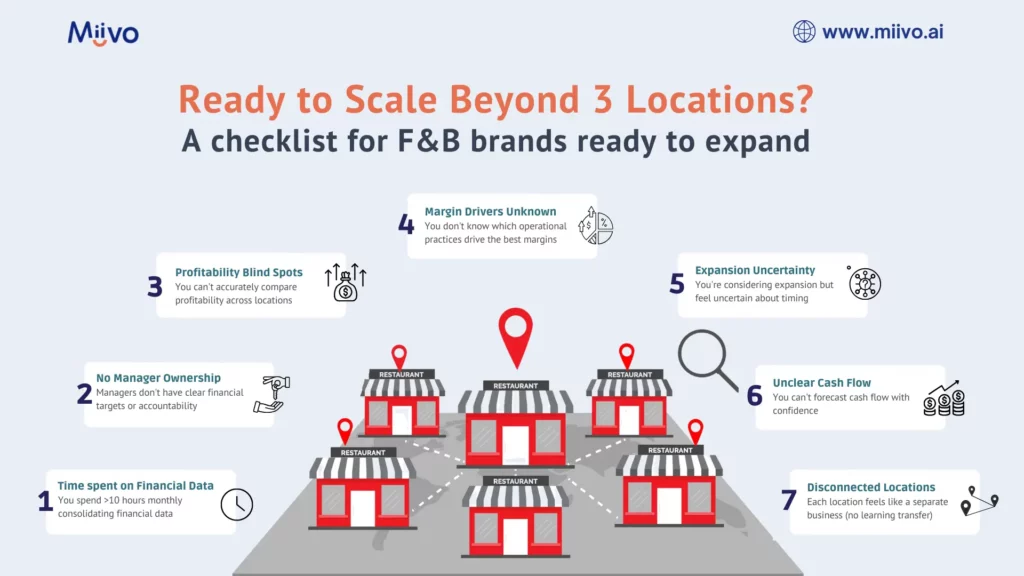
Checklist for F&B brands ready to expand

Checklist: Are You Ready to Scale Past 3 Locations?

☐ You spend >10 hours monthly consolidating financial data

☐ You can’t accurately compare profitability across locations

☐ You don’t know which operational practices drive the best margins

☐ You can’t forecast cash flow with confidence

☐ You’re considering expansion but feel uncertain about timing

☐ Each location feels like a separate business (no learning transfer)

☐ Managers don’t have clear financial targets or accountability

☐ You feel burned out managing multiple locations

Score 4+: You’re ready for a financial visibility system and will unlock significant growth.

Conclusion: Financial Visibility Is Your Scaling Enabler

The F&B scaling wall exists because most operators try to scale without financial visibility.

They open location 2, then location 3, and discover that without understanding their unit economics, they can’t replicate success or make confident expansion decisions.

The operators who scale past 3 locations and grow confidently to 8-10+ locations have one thing in common: they implement financial visibility systems that give them real-time insight into what drives profitability.

With this insight, they:

  • Identify best practices and replicate them
  • Correct problems before they cascade
  • Forecast cash flow and plan expansion
  • Empower managers through transparency
  • Scale deliberately instead of chaotically

Restaurant-specific financial management tools exist precisely for this reason: to help F&B operators see what’s actually happening across their multi-unit operations so they can scale confidently.

The question isn’t whether financial visibility will help you scale. It absolutely will. The question is whether you’ll implement it before attempting your next expansion.

Categories
Uncategorized

How to Make Faster Business Decisions Without Hiring a CFO

Introduction: The CFO Affordability Crisis

You need financial expertise to make smart growth decisions. But hiring a CFO costs $150,000-$300,000+ annually more than many small business owners can justify.

What’s the alternative? Fly blind and hope your instincts work out?

According to McKinsey’s SME Growth Report 2024, businesses making strategic decisions based on financial data grow 3.2x faster than those relying on intuition alone. Yet most SMEs don’t have access to CFO-level financial expertise.

The gap between “knowing you need data-driven decisions” and “having the means to get expert financial guidance” has created an opportunity for AI-powered business advisors.

In this guide, we’ll explore how modern SMEs are making faster, better business decisions without the CFO price tag and how you can too.

Why CFO-Level Guidance Matters (But Hiring a CFO Doesn’t Make Sense)

The Decision Speed Problem

Your business faces constant choices:

  • Should we hire that sales person now or wait until Q2?
  • Do we expand to a new location?
  • Should we increase marketing spend by 30%?
  • Is this new product line actually profitable?
  • Should we take on venture capital or bootstrap?

Without financial context, these are pure guesses. With financial context, they become calculated decisions.

The best CFOs don’t just report what happened—they connect financial data to business outcomes, offering probabilistic guidance:

“Based on our cash position ($150K), runway (8 months), and customer acquisition cost ($450), we can safely hire one sales person now and another in Q2. This maintains 6-month cash runway while accelerating growth.”

That kind of clarity is worth its weight in gold. But it requires someone who:

  1. Understands your specific numbers
  2. Has context about your industry benchmarks
  3. Can model scenarios and understand trade-offs
  4. Can explain recommendations in business terms (not accounting jargon)

The Cost Barrier

Full-time CFO: $150K-$300K+ annually
Fractional CFO (part-time): $5,000-$15,000/month ($60K-$180K/year)
Big Four advisory: $300-$500/hour+

For most SMEs, this is unaffordable. Especially when the business might not need 40 hours/week of CFO time—maybe 5-10 hours/week would suffice.

The Solution Gap

What SMEs actually need:

  • Real-time financial visibility (not month-end reports)
  • Quick answers to specific questions (not lengthy consulting engagements)
  • Scenario modeling (what if we raised prices 5%? hired 2 people?)
  • Actionable recommendations (not just analysis)
  • Affordable access to this guidance

This is where AI-powered business advisors like Miivo step in.

How AI Advisors Deliver CFO-Level Insights in 60 Seconds

The Traditional CFO Workflow

  1. Request: You ask the CFO a question
  2. Data gathering: CFO pulls data from multiple systems (5-15 minutes)
  3. Analysis: CFO analyzes and models scenarios (30-120 minutes)
  4. Interpretation: CFO explains findings and recommendations (15-30 minutes)
  5. Decision: You make decision (could take days due to CFO availability)

Total time: 1-4 hours per decision (spread across multiple days or weeks)

The AI Advisor Workflow

  1. Question: You ask via chat/app
  2. Instant analysis: AI already has your data integrated, runs analysis in seconds
  3. Explanation: AI provides findings in plain English with recommendations
  4. Decision: You decide immediately

Total time: 60 seconds to 5 minutes per decision

What This Enables

Faster iteration: Instead of quarterly strategic reviews, you can test decisions weekly.
Better calibration: You see impact of decisions faster, course-correct more quickly.
Higher confidence: Data-driven decisions reduce decision paralysis and second-guessing.
Continuous optimization: Small improvements compound into significant results over time.

Real-World Example: How a $5M SaaS Company Made Better Decisions Faster

The Situation:
Mike’s SaaS company had $5M ARR but was growing only 8% quarter-over-quarter. It should be growing 20%+. He had several theories about what to fix:

  • Hire more salespeople?
  • Increase marketing spend?
  • Improve product-market fit?
  • Lower churn?

Without a CFO to analyze unit economics, he couldn’t tell which would have the biggest impact.

The Old Way:
Mike would have hired a fractional CFO ($10K/month) for 3 months to analyze the situation ($30K total). The analysis would take weeks and might recommend sales hiring (but Mike’s gut said marketing was the issue).

With AI Advisor (Miivo):
Mike connected his systems and asked: “What’s our unit economics breakdown, and which lever has the biggest impact on growth?”

Instant answer:

  • Customer Acquisition Cost (CAC): $1,200
  • Lifetime Value (LTV): $6,000 (LTV:CAC ratio 5:1, healthy)
  • Growth bottleneck: Churn spiking at 8% monthly (vs. 4% industry average)
  • Recommendation: Focus on retention before acquiring new customers. Hire customer success, reduce churn to 5%. This alone would improve growth from 8% to 14% without additional marketing spend.

Impact: Mike hired one customer success person (+$60K/year cost) and reduced churn to 5% within 90 days. Net result: Growth accelerated to 15%, and LTV:CAC improved from 5:1 to 7.5:1.

ROI: Mike saved $30K in consulting fees, avoided expensive hiring mistakes, and generated $500K+ in additional ARR.

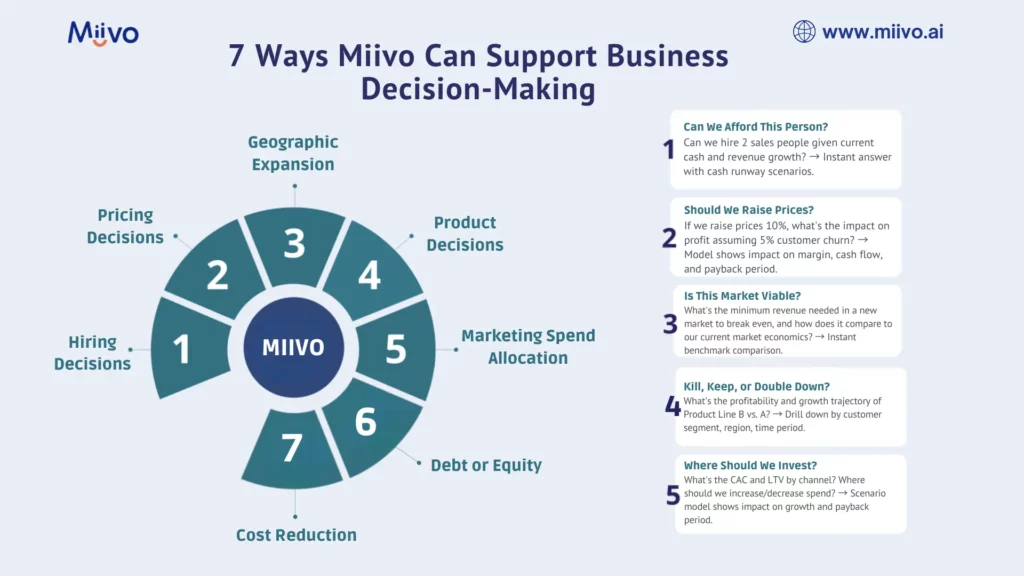
7 Key Business Decisions AI Advisors Help You Make Faster

1. Hiring Decisions: Can We Afford This Person?

Old way: Guess based on feeling, or ask your accountant for a job cost analysis (takes 5-10 days).
AI way: “Can we hire 2 sales people given current cash and revenue growth?” → Instant answer with cash runway scenarios.

2. Pricing Decisions: Should We Raise Prices?

Old way: Research competitors, gut feel, maybe a CFO analysis of margin impact.
AI way: “If we raise prices 10%, what’s the impact on profit assuming 5% customer churn?” → Model shows impact on margin, cash flow, and payback period.

3. Geographic Expansion: Is This Market Viable?

Old way: Lengthy market analysis, risk assessment discussions.
AI way: “What’s the minimum revenue needed in a new market to break even, and how does it compare to our current market economics?” → Instant benchmark comparison.

4. Product Decisions: Kill, Keep, or Double Down?

Old way: Product review meetings, margin analysis, guesswork.
AI way: “What’s the profitability and growth trajectory of Product Line B vs. A?” → Drill down by customer segment, region, time period.

5. Marketing Spend Allocation: Where Should We Invest?

Old way: Marketing intuition + CFO’s historical analysis.
AI way: “What’s the CAC and LTV by channel? Where should we increase/decrease spend?” → Scenario model shows impact on growth and payback period.

6. Debt or Equity: How Should We Fund Growth?

Old way: Weeks of analysis with CFO and lender discussions.
AI way: “Given our cash flow and growth trajectory, can we service $500K in debt vs. raising equity?” → Model shows scenarios and implications.

7. Cost Reduction: Where Should We Cut?

Old way: Across-the-board cuts or consultants to identify savings.
AI way: “What costs are trending highest? Where are we spending more than industry peers?” → Identify quick wins and strategic cuts.

The CFO Alternative: AI-Powered Financial Advisors

How They Work

Step 1: Data Integration

  • Connect accounting software (QuickBooks, Xero, NetSuite)
  • Link banking and payment processors (Stripe, Square, PayPal)
  • Integrate CRM for customer data (Salesforce, HubSpot, Pipedrive)
  • Add operational data (inventory, HR, project management)

Step 2: Intelligence Layer

  • AI analyzes data patterns and trends
  • Compares metrics against industry benchmarks
  • Models different scenarios and outcomes
  • Identifies risks and opportunities

Step 3: Plain-English Guidance

  • “Your cash flow is tightening. At current burn rate, you have 6 months runway. Recommend accelerating revenue or reducing costs by $X/month.”
  • “You can safely hire 2 people this quarter and maintain 6-month runway.”
  • “Your LTV:CAC ratio is declining. Recommend testing new channels or improving retention.”

Step 4: Actionable Tasks

  • AI generates specific action items with implementation steps
  • Prioritizes by impact and feasibility
  • Tracks progress and outcomes

Comparing Financial Guidance Options

OptionCostResponse TimeExpertiseScalabilityBest For
Full-time CFO$150K-$300K/yearHours to daysHighestLimitedLarge companies ($50M+)
Fractional CFO$5K-$15K/monthDays to weeksHighLimited$10M-$50M companies
CFO Advisory Firms$300-$500/hourWeeksHighLimitedOne-off projects
AI Advisor (Miivo)$399/month60 secondsContextualUnlimitedSMEs ($1M-$50M)
Your own team$0 (sunk cost)DaysVariableLimitedOngoing operation

How to Choose the Right Tool for Faster Decisions

If You’re Currently Using a CFO (Part-time or Full-time)

Consider supplementing with AI advisors for:

  • Filling gaps between scheduled CFO meetings (instant answers)
  • Running quick scenario models (instead of requesting formal analysis)
  • Continuous monitoring and alerts (instead of monthly reviews)
  • Freeing up CFO time for high-level strategy

Cost: Often less expensive than CFO + produces faster insights

If You Don’t Have a CFO

Key criteria for AI advisor selection:

✓ Real-time data integration (connects to your systems)

✓ Contextual insights (understands your specific business, not generic advice)

✓ Plain English explanations (not accounting jargon)

✓ Actionable recommendations (not just analysis)

✓ Scenario modeling (what-if analysis)

✓ Industry benchmarks (compare against peers)

✓ Mobile/chat access (get answers on the go)

✓ Affordable pricing (<$500/month for SMEs)

Implementation: Moving from Slow to Fast Decision-Making

Week 1: Setup & Integration

  • Choose your AI advisor platform
  • Connect data sources (accounting, banking, CRM)
  • Configure industry/business-type settings
  • Invite team members

Week 2: Training & Onboarding

  • Team familiarization with dashboards and chat interface
  • Practice asking questions and interpreting answers
  • Establish decision-making workflows

Week 3: Active Use

  • Start asking real business questions
  • Document decisions and outcomes
  • Refine which metrics matter most

Week 4: Optimization

  • Review decision speed improvements
  • Adjust dashboards based on what matters
  • Establish weekly/monthly decision cycles

The Business Impact of Faster Decisions

Decision Speed Multiplier

Businesses that go from slow (decisions every 30 days) to fast (decisions every week) see:

  • 3x faster optimization cycles
  • 2x faster error correction (catch problems sooner)
  • 20-30% faster growth (through continuous iteration)

Real Numbers

Slow Decision Business:

  • Quarterly strategy reviews: 1 per quarter
  • Monthly financial reviews: 1 per month
  • Strategic iterations per year: 4-12

Fast Decision Business:

  • Weekly dashboards: 52 per year
  • Real-time alerts: 365+ per year
  • Strategic iterations per year: 52-104

Over 3 years, fast-decision businesses make 100-200 more strategic iterations, leading to:

  • 25-40% higher growth rates
  • 15-25% higher margins (through continuous optimization)
  • 30-50% faster path to profitability

Conclusion: Decisions Drive Outcomes

You don’t need to hire a $250K CFO to make smart business decisions. You need access to real-time financial insights, benchmark comparisons, and scenario modeling capabilities—all delivered in 60 seconds instead of 60 days.

AI-powered financial advisors like Miivo

 give you exactly that. They level the playing field between well-funded companies with CFOs and lean startups without them.

The result? Faster decisions, better outcomes, and higher growth.

Categories
Uncategorized

Multi-Location Business Owners: How to Stop the Financial Data Chaos

Introduction: The Multi-Location Nightmare

You own three retail stores. Each location has its own manager, POS system, and way of tracking expenses. Your accountant requests data from each location separately. You spend hours every week consolidating spreadsheets. By the time you have a complete financial picture, it’s already outdated.
Sound familiar?

Multi-location business owners face a unique challenge: financial visibility becomes exponentially harder as you expand. What worked with one location breaks down at three. What barely functioned at three becomes impossible at ten.

According to the Small Business Trends Report 2025, 72% of multi-location business owners report significant challenges in consolidating financial data across locations, leading to delayed insights, missed cost-saving opportunities, and inconsistent profitability metrics.

The good news? Modern technology can eliminate this chaos entirely.

In this guide, we’ll explore the real costs of financial data fragmentation, why consolidation matters, and how tools like Miivo help multi-location businesses achieve real-time financial visibility across all operations.

The Multi-Location Financial Data Crisis

Why Data Silos Destroy Profitability

When you operate multiple locations, each one generates financial data independently:

  • POS systems record sales and transactions
  • Accounting software tracks expenses, payroll, inventory
  • Bank accounts show cash positions at each location
  • Payment processors (Stripe, Square, PayPal) handle different payment methods
  • Inventory systems may be completely separate or incompatible

Without a central system pulling all this data together, you face critical problems.

Impact of fragmented data

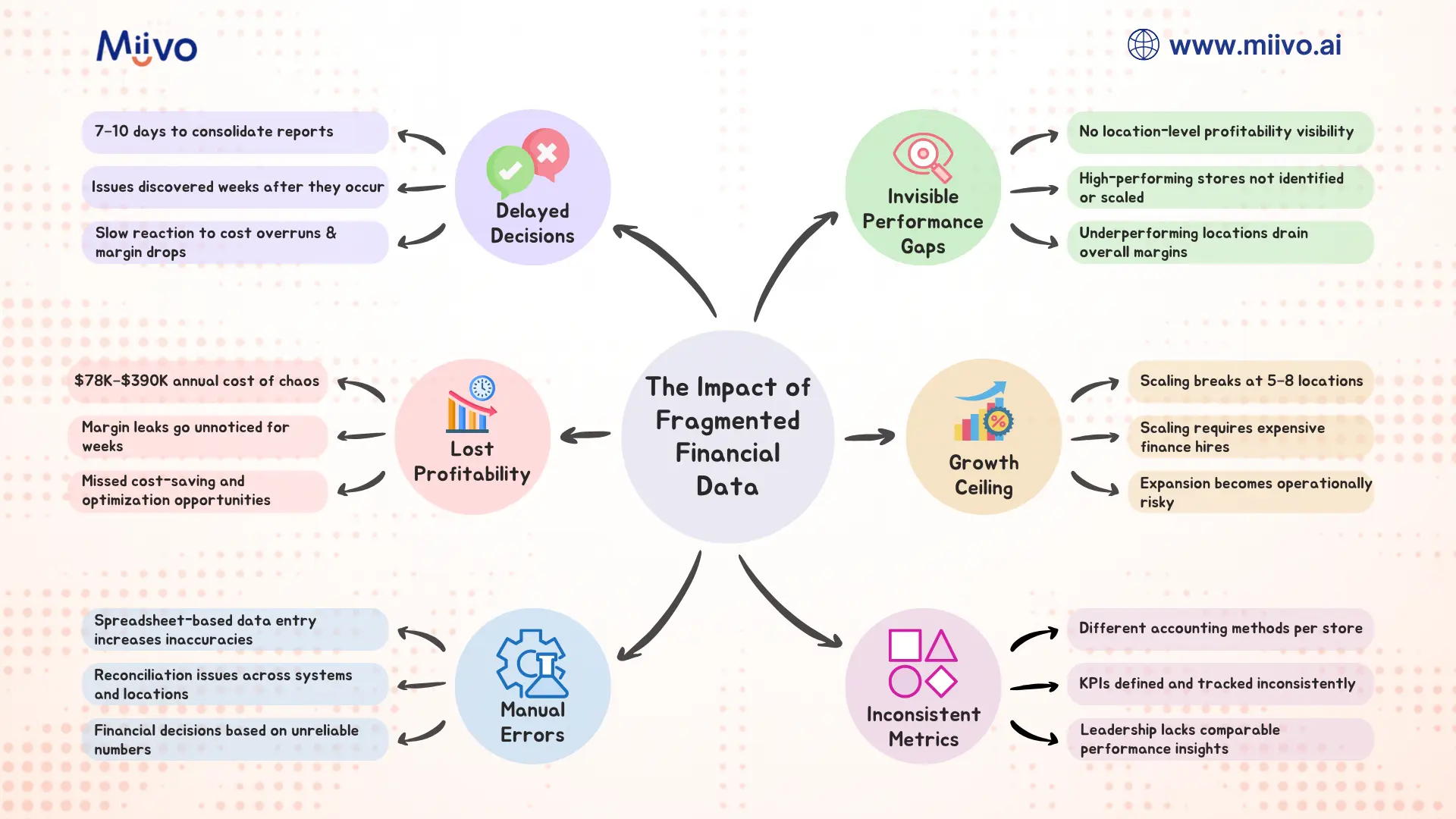
Problem 1: The Consolidation Tax (10-20 Hours/Month)

Your finance team spends countless hours manually pulling data from each location:

  • Logging into multiple accounting systems
  • Downloading reports from various platforms
  • Copying data into master spreadsheets
  • Reconciling discrepancies and fixing errors
  • Recalculating metrics for the consolidated view

For a 3-location business with a part-time bookkeeper, this “consolidation tax” equals 10-15 hours monthly. At $50/hour, that’s $500-$750/month in pure overhead—time that could go toward strategic analysis instead.

For a 10-location business? You’re looking at 30-40 hours monthly, or $1,500-$2,000 in wasted labor costs.

Problem 2: Delayed Visibility = Missed Opportunities

Manual consolidation typically takes 7-10 days after month-end. By then:

  • A location’s profitability crisis has already spiraled
  • Cost overrun has gone unchecked for weeks
  • Seasonal trend opportunity has passed
  • A competitor’s pricing shift is already affecting your margins

McKinsey’s research on multi-unit retail operations found that businesses with real-time, location-level financial visibility made strategic adjustments 6-8 weeks faster than those relying on consolidated month-end reports.

This speed advantage compounds: a business that catches and corrects a location-level profitability issue in week 2 (vs. week 6) captures 4 weeks of margin recovery, potentially worth $5,000-$25,000 depending on location size and profit margins.

Problem 3: Invisible Profitability Gaps

Without location-level profitability analysis, you can’t see critical trends:

  • Location A is highly profitable, Location B is barely breaking even, and you have no idea why
  • Store 1 has 15% shrink, Store 2 has 3%, but you’re managing inventory system-wide
  • Location 3’s customer acquisition cost is double the others, yet you’re using the same marketing budget allocation
  • One location’s labor costs are 35% of revenue while another’s are 28%, and you haven’t noticed

These invisible gaps mean you’re likely overstaffing low-performing locations and under-resourcecing winners, systematically destroying profitability.

Problem 4: Inconsistent Reporting & Decision-Making

Different locations report different metrics in different formats. Your stores use different accounting methods. One uses cash accounting, another accrual. One categorizes “supplies” differently than another.

When the CEO requests “profitability by location,” you spend hours standardizing definitions, recalculating, and reconciling. By then, the decision window has passed.

Result? Strategic decisions are made on incomplete or unreliable data, leading to poor allocation of capital, talent, and marketing resources.

Problem 5: Scalability Ceiling

Here’s the hard truth: manual consolidation doesn’t scale. You can barely handle 3 locations. At 5-7 locations, your finance person is drowning. At 10+ locations, manual processes completely break.

Many multi-location businesses hit this “growth ceiling” at 5-8 locations and can’t scale further without hiring full-time finance staff—a $60-100K annual expense that doesn’t generate revenue.

The Real Cost of Financial Data Chaos

Direct Costs

  • Labor: 10-40 hours/month at $50/hour = $500-$2,000/month
  • Software: Duplicate accounting software licenses for each location = $100-$500/month
  • Errors: Manual data entry mistakes requiring correction = $1,000-$5,000/month (understated)
  • Missed opportunities: Delayed visibility costing margin recovery = $5,000-$25,000/month

Total Monthly Cost: $6,500-$32,500

Annual Cost of Chaos: $78,000-$390,000

Indirect Costs

  • Decision delays: Strategies implemented 6-8 weeks late lose compounding advantage
  • Inconsistent execution: Locations operate with different rules, metrics, and priorities
  • Talent constraints: Finance team overwhelmed with data consolidation, no capacity for analysis
  • Growth paralysis: Can’t scale to new locations without major operational restructuring
  • Investor/lender concerns: Inconsistent financial reporting raises red flags during fundraising or refinancing

The Solution: Centralized Financial Visibility

What Centralized Visibility Looks Like

Imagine this: Every morning, you open a single dashboard and instantly see:

  • Real-time sales data from all locations
  • Profitability by location (with unit economics drill-down)
  • Labor cost allocation by store
  • Inventory position across all locations
  • Cash position aggregated and by location
  • Key metrics (margin %, traffic, AOV, labor cost %, shrink) with location-level comparisons

All data is current to yesterday, automatically consolidated, and pre-calculated. No spreadsheets. No manual work.

You notice Location 2 is trending negative on margin. You drill into the dashboard and see it’s due to labor costs spiking after a seasonal hire didn’t work out. You send a message to the Location 2 manager with recommendations. Problem solved before it metastasizes.

You compare Location 3’s profitability to Location 1 and notice Location 3 has higher shrink. You investigate and find an inventory tracking issue that’s been costing $2,000/month. Fixed in an afternoon.

This is centralized financial visibility in action and it’s transformable.

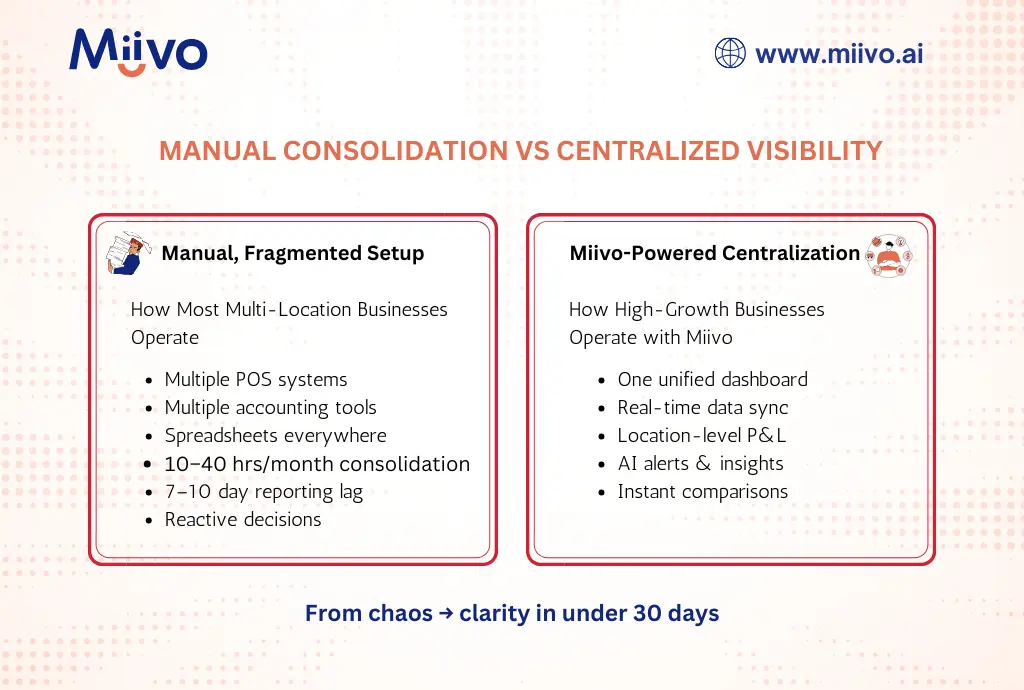
How Miivo Solves Multi-Location Chaos

Miivo is specifically designed for businesses like yours:

Manual setup vs Miivo powered centralized setup

  1. One-Click Consolidation
    • Connect all your POS systems, accounting software, bank accounts, and inventory systems
    • Miivo automatically pulls data from each location in real-time
    • Zero manual data entry required
  1. Location-Level Profitability Analysis
    • See profit & loss by store, down to the SKU level
    • Compare unit economics across locations (AOV, conversion rate, customer acquisition cost)
    • Identify high-performers and under performers instantly
  1. Standardized Metrics
    • All locations report using the same definitions and accounting methods
    • Pre-built KPI dashboards adapted to your business model
    • Industry benchmarks help you identify anomalies quickly
  1. Real-Time Alerts
    • Flag when a location’s profitability drops below target
    • Alert you to unusual spending patterns (e.g., Location 1 labor costs suddenly up 20%)
    • Highlight opportunities (e.g., Location 3 has excess cash, Location 2 needs attention)
  1. Actionable Recommendations
    • “Location 2’s profitability is trending negative due to [specific reason]. Here’s the action plan…”
    • Automatic task generation for management team
    • Clear implementation steps with expected outcomes
  1. Mobile Access
    • Check financial health across all locations via WhatsApp or mobile app
    • Get answers to questions like “What’s our cash position across all stores?” instantly
    • Share real-time dashboards with location managers and lenders

Real-World Example: How a 5-Location Fitness Chain Got Visibility Back

The Situation:
Sarah owned 5 fitness studios across a metro area. Each had its own POS system, accounting setup, and management style. She spent 15+ hours every week consolidating data from all locations into a master spreadsheet. By the time she had the full picture, it was already 10 days old.

The Problem:

  • Studio 3 was struggling profitability-wise, but Sarah couldn’t pinpoint why
  • She didn’t know if it was too many staff members, low member acquisition, or high churn
  • Marketing budget was allocated equally across all studios—clearly wrong, but she had no data to prove it
  • She had no idea which classes were most profitable
  • Expansion to a 6th studio felt impossible given how overwhelmed she already was

The Solution:
Sarah implemented Miivo and connected all 5 studios’ data sources. Within 48 hours:

Findings:

  1. Studio 3’s problem identified: 28% labor cost vs. 22% at other studios. Investigation revealed over-scheduling during off-peak hours.
  2. Marketing inefficiency discovered: Studio 1 had 40% higher member acquisition cost than Studio 4, despite same market. Different acquisition channels had vastly different efficiency.
  3. Class profitability analyzed: High-attendance classes (yoga, HIIT) had different per-member economics than niche classes. She could optimize scheduling accordingly.
  4. Cash position clarity: Studios 1 and 2 had excess cash; Studios 3 and 4 were tight. She could reallocate working capital more efficiently.

Results:

  • Reduced weekly consolidation work from 15 hours to 1 hour
  • Fixed Studio 3’s labor scheduling, recovering $3,000/month profitability
  • Optimized marketing spend allocation by channel, improving member acquisition by 18%
  • Expanded to 6th studio with confidence (had the systems and visibility to manage it)
  • Promoted Studio 1 manager to regional operations (she had the data to identify the best performer)

MRR Impact: +$8,500 from operational improvements alone

How to Consolidate Your Financial Data: Implementation Roadmap

Step 1: Audit Your Current Data Sources (Week 1)

Document all systems generating financial data:

  • POS Systems: Square, Toast, Lightspeed, custom?
  • Accounting: QuickBooks Online, Xero, custom?
  • Payments: Stripe, Square, PayPal?
  • Inventory: Dedicated system or within accounting software?
  • Banking: Single master account or separate accounts per location?

Deliverable: List of 10-15 data sources and their current integration status

Step 2: Choose Your Consolidation Platform (Week 2)

Evaluate options:

  • Dedicated multi-location BI tools: Tableau, Power BI, Looker (expensive, complex)
  • Accounting software add-ons: Spotlight Reporting, Fathom (limited scope, still requires integration work)
  • AI-powered SME advisors: Miivo (consolidation + insights + automation)

Key Criteria:

  • Supports all your data sources
  • Real-time data refresh (not daily or monthly)
  • Location-level drill-down capability
  • Pre-built SME/retail dashboards (don’t want to build from scratch)
  • Mobile and web access
  • Customer support for implementation

Step 3: Implementation (Weeks 3-4)

  1. Connect data sources: Authorize each system, set up API connections or direct integrations
  2. Configure location hierarchies: Define how locations map in the platform
  3. Standardize metrics: Ensure consistent definitions across locations
  4. Build dashboards: Customize views for CEO, location managers, finance team

Step 4: Train Your Team (Week 4)

  • Finance team on data governance and updates
  • Location managers on accessing location-level performance data
  • Leadership on interpreting dashboards and making decisions

Step 5: Optimize & Scale (Ongoing)

  • Review dashboards weekly to validate accuracy
  • Adjust metrics based on what matters most
  • Add new locations easily (no rebuilding required)

Comparing Consolidation Approaches

Approach Time to Consolidate Data Currency Cost Scalability Insights
Manual Spreadsheets 7-10 days Stale $500-$2,000/mo labor ✗ Breaks at 5+ locations None—just data
BI Tools (Tableau, Power BI) 2-3 days 1 day lag $500-$3,000/mo + implementation ✓ Scales but requires expertise Limited—you build queries
Accounting Add-ons 3-5 days Overnight $100-$500/mo ✓ Limited to accounting data Reporting only
Miivo AI Advisor Real-time Current to yesterday $399/mo ✓ Scales effortlessly Actionable insights + recommendations

The ROI of Consolidation

Conservative Estimate (3 Locations, $3M Annual Revenue)

Current State Costs:

  • Labor: $750/mo = $9,000/year
  • Duplicate software: $200/mo = $2,400/year
  • Missed opportunities (conservative): $5,000/mo = $60,000/year
  • Total annual cost: $71,400

With Consolidation (Miivo at $399/mo):

  • Labor: $0 (automated) = $0
  • Software: $399/mo = $4,788/year
  • Operational improvements (margin recovery, optimization): $2,000/mo = $24,000/year
  • Net savings: ~$42,612/year

ROI: 1,177% annual return (saves ~$42,600 vs. costs $4,800)

Payback period: Less than 2 weeks

Realistic Scenario (5 Locations, $10M Annual Revenue)

Current State Costs:

  • Labor: $2,000/mo = $24,000/year
  • Duplicate software: $500/mo = $6,000/year
  • Missed opportunities (conservative): $8,000/mo = $96,000/year
  • Total annual cost: $126,000

With Consolidation:

  • Labor: $0 (automated) = $0
  • Software: $399/mo = $4,788/year
  • Operational improvements: $4,000/mo = $48,000/year
  • Net savings: ~$121,212/year

ROI: 2,533% annual return

Payback period: Less than 1 week

Why Multi-Location Businesses Choose Miivo

Miivo goes beyond consolidation—it provides strategic insight:

  1. Automated Consolidation
    No more manual spreadsheet work. Connect once, get real-time consolidated view forever.
  2. Location-Level Intelligence
    Drill down to understand what’s driving profitability (or losses) at each location.
  3. AI-Powered Recommendations
    “Your Boston location is trending negative due to labor cost spike. Here’s the fix…”
  4. Location Manager Empowerment
    Managers see their location’s metrics compared to peers, driving healthy competition and accountability.
  5. Scaling Made Easy
    Add new locations to your dashboard in minutes. Same consolidation magic applies immediately.
  6. Mobile & Chat-Based
    Check on your business via WhatsApp or mobile app anytime, anywhere.

Checklist: Is Your Multi-Location Business Ready for Consolidation?

☐ You spend >5 hours/week consolidating financial data across locations

☐ Your financial reports are 5+ days behind current operations

☐ You don’t have location-level profitability visibility

☐ Different locations report using different metrics or accounting methods

☐ You have 3+ locations and plan to expand further

☐ Growth is being constrained by inability to manage multiple locations effectively

☐ You want to empower location managers with performance data

Score: If you checked 4+, consolidation should be your immediate priority.

The Path Forward: Taking Action This Week

Day 1: List all your data sources and current pain points
Day 2: Schedule a demo with Miivo to explore your specific use case
Day 3: Evaluate the implementation timeline and cost
Day 4: Make the decision and begin implementation
Week 2: Connected systems and initial dashboard setup
Week 3: Train your team
Week 4: Start making data-driven decisions across all locations

Most multi-location businesses see ROI within the first month.

Conclusion: From Chaos to Clarity

Financial data chaos isn’t just annoying—it costs you tens of thousands of dollars annually in lost labor, missed opportunities, and suboptimal decisions.

The solution isn’t hiring more finance staff. It’s implementing modern financial consolidation and intelligence tools that automatically pull your data together, identify insights, and recommend actions.

With Miivo, you can go from drowning in spreadsheets to having real-time, location-level financial visibility in days. You’ll spend less time consolidating and more time strategizing. You’ll make faster, better-informed decisions. And you’ll unlock significant profitability improvements and scalability.

The question isn’t whether you can afford to consolidate your financial data. It’s whether you can afford not to.

Categories
Uncategorized

Why 82% of Small Businesses Fail Due to Cash Flow Issues (And How to Avoid It)


If you’re a small business owner, you’ve probably heard the sobering statistic: 82% of small businesses fail because of cash flow problems. But what does that actually mean for your business? And more importantly, how do you make sure you’re not part of that statistic?

Cash flow isn’t just about having money in the bank. It’s about timing, visibility, and control three things most SME owners struggle with daily. According to a 2025 study by the Federal Reserve, 60% of small businesses face cash flow gaps between paying suppliers and receiving customer payments, creating a constant cycle of financial stress.

In this guide, we’ll break down why cash flow kills businesses, reveal the hidden warning signs you might be missing, and show you practical, actionable steps to take control without needing a finance degree or hiring a CFO.

The Brutal Truth: Why Cash Flow Management Is Make-or-Break for SMEs

Understanding the 82% Statistic

Let’s get real for a moment. When we say “82% of businesses fail due to cash flow issues,” we’re not talking about businesses that ran out of customers or had bad products. We’re talking about profitable businesses that simply ran out of cash at the wrong time.

Here’s how it typically plays out:

  • Month 1: You land a big client. Exciting! They agree to Net-60 payment terms (payment within 60 days).
  • Month 2: You need to pay your suppliers, employees, and rent. Your bank account balance: $12,000. Your expenses: $15,000. You dip into savings or use a credit card.
  • Month 3: The client still hasn’t paid (they’re at 45 days). Your next batch of expenses is due. You’re now $8,000 short. Panic sets in.
  • Month 4: By the time the client pays (at 75 days, not 60), you’ve already missed supplier payments, damaged vendor relationships, and paid late fees. Your stress is through the roof.

This is cash flow failure and it happens to businesses making money on paper.

The Three Hidden Killers

According to CRISIL’s SME Financial Health Report 2025, there are three primary reasons SMEs face cash flow catastrophes:

1. Delayed Customer Payments (Cited by 68% of SMEs)

Research shows that the average SME waits 42 days past the invoice date to receive payment but expenses don’t wait.

A retail distributor in Phoenix reported losing a $18,000 opportunity because they couldn’t afford to purchase inventory while waiting for customer payments.

2. Inaccurate Cash Flow Forecasting (Cited by 54% of SMEs)

Most SMEs don’t forecast cash flow beyond 30 days. Only 52% of UK SMEs regularly produce cash flow forecasts, meaning they’re flying blind into financial turbulence.

The Problem: You might have  $20,000 today, but if you have $35,000 in expenses next week and only $5,000 in expected receivables, you’re in trouble and you won’t see it coming.

3. Lack of Real-Time Financial Visibility (Cited by 61% of SMEs)

Here’s where it gets painful: 61% of SMEs don’t have a clear, real-time view of their cash position. Financial data is spread across bank accounts, accounting software, spreadsheets, and the bookkeeper’s email.

The Warning Signs You’re Heading Toward Cash Flow Crisis

Self-Audit: Are You at Risk?

Answer these questions honestly:

  • Do you check your bank balance multiple times per day with anxiety?
  • Have you delayed paying a supplier to make payroll in the last 6 months?
  • Are you using personal funds or credit cards to cover business expenses regularly?
  • Do you struggle to answer “What’s our cash position 30 days from now?”

If you checked 2+ boxes, you’re experiencing cash flow stress. If you checked 4+, you’re in a high-risk zone.

The Numbers Don’t Lie: Early Warning Indicators

Goldman Sachs’ 10,000 Small Businesses research identified these financial red flags:

Warning Sign What It Means Risk Level
Days Sales Outstanding (DSO) >45 days Customers paying too slowly HIGH
Current Ratio <1.5 Not enough liquid assets to cover short-term liabilities HIGH
Operating Cash Flow negative 2+ consecutive months Burning more cash than generating CRITICAL
Cash Conversion Cycle >60 days Too long between spending and collecting MEDIUM-HIGH
Emergency Cash Reserve <2 months expenses No buffer for disruptions CRITICAL


Stat Alert – According to Money Advice Trust research, 29% of SMEs cite cash flow worries as a barrier to growth, and 33% regularly lose sleep worrying about business finances.

The Root Cause: Why SMEs Struggle with Cash Flow

It’s Not About Revenue, It’s About Timing

Here’s a paradox: You can have a profitable month and still run out of cash.

Example: Revenue: $50,000 (on paper) | Expenses: $35,000 (paid immediately) | Profit: $15,000.

BUT: If that $50,000 revenue is tied up in unpaid invoices for 60 days, and you need to pay $35,000 today, you’re short $35,000 in cash. This is the timing trap.

The Manual Reporting Trap

A 2025 study by the University of Gloucestershire found that SMEs using manual financial processes experience:

  • 15-20% lost productivity due to data entry time
  • 12% higher error rates in financial reporting
  • 3-week delay in identifying cash flow issues

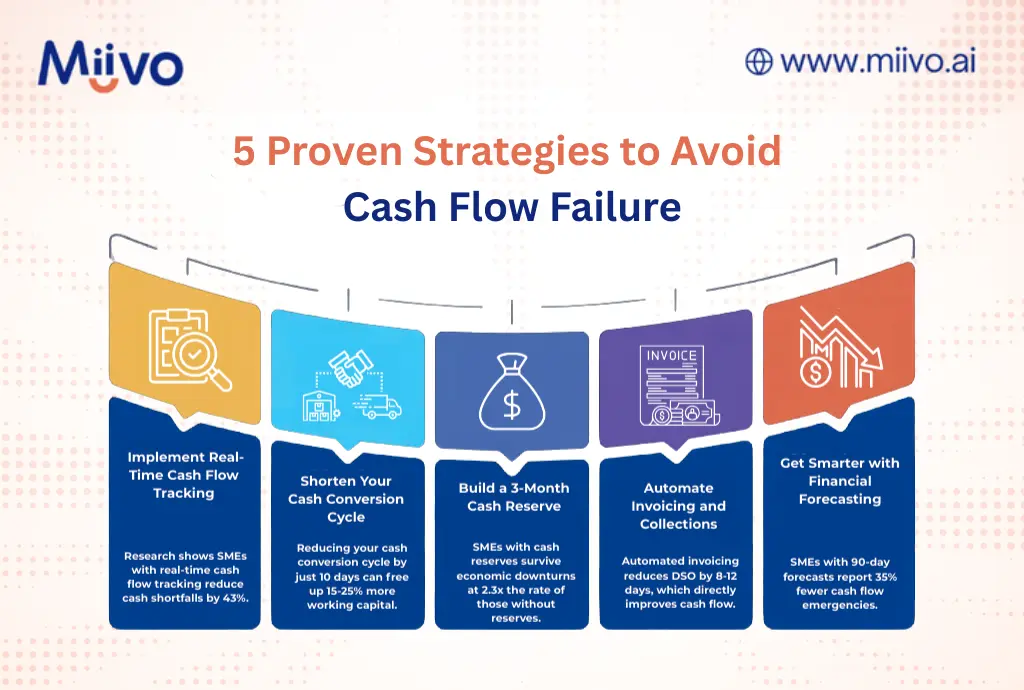
The Solution: 5 Proven Strategies to Avoid Cash Flow Failure

Strategy #1: Implement Real-Time Cash Flow Tracking

The Problem: You’re looking at last month’s numbers to make today’s decisions.

The Solution: Instead of relying on bank balances alone, use real-time operational and accounting data to understand your true cash position.

Miivo centralizes your accounting, invoicing, receivables, payables, and operational data into a single, continuously updated view, so you can see where cash is coming from, going to, and getting stuck before it becomes a crisis.

Outcome: Research shows SMEs with real-time tracking reduce cash shortfalls by 43%.

strategies to avoid cash flow failures

Strategy #2: Shorten Your Cash Conversion Cycle

The Problem: Your money is stuck in the business cycle (inventory → sales → receivables) for too long.

The Solution: Accelerate each stage of the cycle.

Action Steps:

For Inventory-Based Businesses:

  • Negotiate shorter supplier payment terms (e.g., Net-45 → Net-30)
  • Offer early payment discounts to customers (2% discount for payment within 10 days)
  • Implement just-in-time inventory to reduce cash tied up in stock

For Service-Based Businesses:

  • Invoice immediately upon project milestone completion (don’t wait until end)
  • Require 50% upfront payment for projects >$10,000
  • Use payment plans with auto-debit for retainer clients

Expected Outcome: Reducing your cash conversion cycle by just 10 days can free up 15-25% more working capital.

Strategy #3: Build a 3-Month Cash Reserve

The Problem: One unexpected expense (equipment breakdown, late client payment) derails your entire month.

The Solution: Establish an emergency cash reserve equal to 3 months of operating expenses.

Action Steps:

  1. Calculate average monthly operating expenses (exclude one-time costs)
  2. Set a goal: 3x monthly expenses (e.g., $15,000/month → $45,000 reserve)
  3. Automate savings: Transfer 5-10% of monthly revenue to reserve account
  4. Use reserve only for genuine emergencies (not growth investments)

Reality Check: This won’t happen overnight. Goldman Sachs research shows it takes 8-12 months for most SMEs to build a 3-month reserve, but even starting with 1 month provides critical protection.

Stat: SMEs with cash reserves survive economic downturns at 2.3x the rate of those without reserves.

Strategy #4: Automate Invoicing and Collections

The Problem: Manual invoicing delays payment by 7-14 days on average.

The Solution: Automated invoicing systems with payment reminders and one-click payment options.

Action Steps:

  1. Use invoicing software that auto-generates invoices upon project completion
  2. Enable one-click payment (credit card, ACH, PayPal)
  3. Set up automated payment reminders (Day 7, 15, 25, 35)
  4. Offer incentives for early payment (1-2% discount)
  5. Implement late fees (after 30 days) to encourage timely payment

Expected Outcome: Automated invoicing reduces DSO (Days Sales Outstanding) by 8-12 days, which directly improves cash flow.

Strategy #5: Get Smarter with Financial Forecasting

The Problem: You don’t know what your cash position will be 30, 60, 90 days from now.

The Solution: Rolling 90-day cash flow forecast updated weekly.

Action Steps:

  1. Week 1: List all expected cash inflows (customer payments, new sales)
  2. Week 1: List all expected cash outflows (payroll, rent, suppliers, taxes)
  3. Week 2: Create a simple spreadsheet or use Miivo’s forecasting tool
  4. Ongoing: Update forecast every Monday with actual vs. expected
  5. Red Flag Protocol: If forecast shows cash shortfall in next 30 days, trigger action plan (delay non-essential expenses, accelerate collections, access line of credit)

Pro Tip: Use conservative estimates. Better to be pleasantly surprised than caught short.

Expected Outcome: SMEs with 90-day forecasts report 35% fewer cash flow emergencies.

How Technology Is Solving the Cash Flow Crisis

The Rise of Real-Time Business Intelligence for SMEs

Here’s the good news: Technology has finally caught up to SME needs.

A decade ago, business intelligence (BI) tools cost $50,000+ and required IT teams. Today, platforms like Miivo offer:

  • Real-time cash flow tracking across multiple bank accounts and locations
  • Automated financial health scores (know your status in 60 seconds)
  • Industry benchmarking (see how your cash flow compares to peers)
  • WhatsApp alerts (get notified when cash drops below threshold no need to log into dashboards)
  • Plain-English insights (“You have 23 days of cash runway” vs. complex spreadsheets)

Stat: According to Salesforce’s 2025 Small Business Intelligence Report, SMEs using BI tools experience:

  • 32% boost in productivity
  • 26% reduction in analysis time
  • 33% increase in insights-driven decisions

Real-World Success Story

Case Study: Phoenix Retail Distributor (Name Anonymized)

Background: 5-location retail distribution business, $1M annual revenue, 35 employees.

Problem: Frequent cash flow gaps due to delayed customer payments. Used spreadsheets to track finances across 5 locations. Spent 12+ hours/week manually consolidating data.

Solution: Implemented Miivo in January 2025.

Results After 90 Days:

  • Reduced manual reporting time: 12 hours/week → 1 hour/week (92% reduction)
  • Improved DSO: 58 days → 42 days (accelerated collections by 16 days)
  • Cash flow visibility: Real-time vs. 2-week lag
  • Identified issue: One location was underperforming by 35% wouldn’t have known without consolidated view
  • ROI:  $21,600 in freed-up working capital in first 90 days

Founder Quote: “For the first time in 8 years, I’m not stressed about making payroll. I know exactly where we stand at any moment.”

Taking Action: Your 30-Day Cash Flow Turnaround Plan

Week 1: Assess Your Current State

  •  Calculate your current cash position
  •  Calculate Days Sales Outstanding (DSO)
  •  List all outstanding invoices >30 days
  •  Review cash flow for last 90 days (identify patterns)

Week 2: Implement Quick Wins

  •  Follow up on all invoices >30 days (call, don’t just email)
  •  Set up automated invoicing for future projects
  •  Negotiate extended payment terms with 2-3 key suppliers

Week 3: Build Your System

  •  Connect bank accounts and accounting software to BI platform
  •  Create 90-day cash flow forecast
  •  Set up weekly cash position review (every Monday 9 AM)

Week 4: Establish Safeguards

  •  Set up low-cash alerts (when balance drops below 30 days expenses)
  •  Start building emergency reserve (even if it’s $500/month)
  •  Document your cash flow management process (so it’s repeatable)

Conclusion: You Don’t Have to Be Part of the 82%

Cash flow failure isn’t inevitable. It’s preventable but only if you treat it with the urgency it deserves.

The bottom line: You can’t manage what you can’t see. And in 2025, there’s no excuse for flying blind on your business finances.

Whether you use Miivo, build your own systems, or hire a part-time CFO, the key is this: Real-time visibility + proactive management = cash flow control.

Don’t wait until you’re staring at a $0 bank balance and wondering where it went wrong. Start today.

Want to See Where You Stand?

Get your free business health score in 60 seconds. Connect your accounts to Miivo and see your cash runway, industry benchmarks, and personalized recommendations no credit card required.

Start Free Health Check


Categories
Uncategorized

Smarter Planning Tools for Small Businesses

Most small business owners create a business plan and they rarely look at it again.

📉 A static plan is a dead plan.

In today’s fast-changing economy, your plan needs to evolve constantly. The most resilient businesses treat planning as a living, breathing system, not a document that gathers digital dust.

Why Static Business Planning Doesn’t Work
Traditional business plans get outdated quickly. Customer behaviour shifts. Market trends evolve. New competitors enter the scene.

Without updates, your plan becomes irrelevant. That puts you at risk of:

  • Making decisions based on old data
  • Missing growth opportunities
  • Losing control of cash flow
  • Falling behind competitors

What Agile Businesses Do Differently?

High-performing businesses use dynamic business planning. Here’s what that looks like:

  • Regularly review actual results vs. forecasts
  • Update assumptions based on real-time performance
  • Quick strategy adjustment with change in conditions

Historically, this approach required expensive software or a dedicated finance team. Today, AI advisor tools like Miivo make it accessible to small businesses.

How Miivo Supports Small Businesses Plan Smarter?

Instead of relying on clunky spreadsheets, Miivo provides an AI-powered platform that empowers businesses to:

  • Replace static spreadsheets
  • Get real-time visibility into business performance
  • Forecast smarter using live data
  • Create an action plan when things go off track

🧠 Real-Time Insights
No more waiting for monthly reports. Once integrated, the platform connects to your systems and displays real-time business insights.

📈 AI-Powered Forecasting
Miivo doesn’t just track performance, it evaluates your numbers against goals or benchmarks. This means you always have an up-to-date, realistic outlook, thanks to our AI advisor tool.

🔔 Smart Action Plan
When something’s off, Miivo suggests what to do next. It not only identifies the main opportunity but also breaks it into manageable sub-tasks. That way, you can take action with confidence.

Why Miivo Is Different?

Most tools show you what happened. Instead, Miivo helps you decide what to do next.

Miivo simplifies everything:

  • A simple, intuitive dashboard
  • No corporate jargon
  • No need for a finance degree

Regardless of your size, whether you’re a solopreneur or managing a growing team, Miivo gives you a strategic edge, minus the complexity.

Your Business Plan Should Evolve. Just Like Your Business.
Business conditions change and sales pipelines shift. Plus, your goals also evolve over time. Given all that, why stick with a frozen plan?

With Miivo, your planning process becomes:

  • Continuous
  • Adaptive
  • Actionable

To conclude, you stay focused on what really matters: sustainable growth.

Ready to act? Start Your Free Trial Today, No Credit Card Required.

Categories
Uncategorized

Understanding Business Cash Flow

Why does cash flow matter?

  • 82% of small businesses fail due to cash flow problems.
  • It keeps your business running, helps you grow, and ensures financial stability.

Key cash flow tips:

  1. Track income & expenses: Use a cash flow statement to monitor daily operations, investments, and funding.
  2. Get paid faster: Offer early payment discounts and set clear terms.
  3. Cut costs smartly: Eliminate unused subscriptions and renegotiate contracts.
  4. Use tools: Software like Miivo simplifies cash flow tracking.

Quick Action Steps:

  • Send invoices promptly.
  • Build a 3–6 month cash reserve.
  • Forecast cash flow for the next 3–12 months.

Remember: Positive cash flow means bringing in more money than you spend – essential for long-term success.

How businesses manage money | Cash Flow explained

Cash Flow Statement Parts

A cash flow statement reveals where your money comes from and how it’s spent. Let’s break down its three main sections to give you a clearer picture of your business finances.

Daily Business Income and Expenses

This part, called operating activities, tracks your everyday income and expenses. It’s the foundation of your business’s financial well-being.

Most of your cash should ideally come from operating activities. As QuickBooks expert Kat Boogaard explains, “Cash flow is the movement of money in and out of your business bank account. Understanding where your cash is coming from and where it’s going is key for decision-making.”

Some examples of operating activities include:

  • Revenue from sales and services
  • Employee wages and salaries
  • Inventory purchases
  • Rent and utilities
  • Tax payments

Why does this matter? Recent data highlights the importance: 25% of small businesses waited a year or more to get paid (or never got paid), and 70% faced delays of one to six months.

Equipment and Property Purchases

Investing activities focus on big-ticket items and long-term assets. This section records cash spent or received for:

  • Buildings and land
  • Vehicles
  • Office equipment
  • Manufacturing machinery
  • Investment securities

For instance, buying a new delivery truck for $45,000 would show as a negative cash flow. On the other hand, selling old equipment for $10,000 would appear as a positive cash flow.

Loans and Business Funding

The financing activities section highlights how your business secures funding from external sources. This includes:

  • Bank loans
  • Credit lines
  • Investor funding
  • Dividend payments
  • Debt repayment

Here’s an example of how these three components work together:

Component Transaction Impact
Operating Monthly sales revenue: $50,000 Positive
Investing New equipment purchase: -$20,000 Negative
Financing Bank loan received: $30,000 Positive

While financing activities can provide much-needed cash, relying too heavily on loans or investors isn’t a sustainable strategy. The ultimate goal is to generate enough cash from operating activities to fuel your business growth.

Cash Flow Management Methods

Managing cash flow effectively means balancing two key objectives: speeding up your incoming payments and controlling expenses. Let’s explore practical ways to achieve both.

Getting Paid Faster

Late payments can disrupt your operations, and addressing this issue could improve your revenue by about $31,000 on average.

Here are some tips to collect payments more efficiently:

  • Set Clear Payment Terms
    Clearly outline due dates, payment methods, and penalties for late payments in your contracts.
  • Streamline Your Invoicing Process
    Errors in invoices often lead to delays. The following strategies can help:
Strategy How to Apply It
Early Payment Discounts Offer discounts for early payments and include terms directly on the invoice.
Late Payment Fees Specify penalties for late payments in your contracts and reminders.
Upfront Deposits Collect substantial deposits (50–70%) before starting a project.
Multiple Payment Options Accept a variety of payment methods – credit cards, ACH, and digital payments – to make it easier for clients to pay.

“It’s the squeaky wheel that gets the oil, so make sure you take an active role in approaching businesses that owe you money. Be firm, but fair.”
– Ben Richmond, U.S. Country Manager, Xero

Once you’ve improved your payment collection process, you can turn your attention to cutting costs.

Reducing Business Expenses

Smart cost management involves lowering expenses without sacrificing quality. Here are some ways to do it:

  • Vendor Management
    Review your suppliers and consolidate where possible to gain better pricing. Negotiating contracts can save up to 9.2% on total contract value.
  • Technology Optimization
    Many businesses waste money on unused software. In fact, unused SaaS licenses can cost up to $18 million annually.

“With completely integrated spend management and travel, we were able to cut T&E costs by 50% with only a 15% reduction in travel.”
– Teddy Collins, Vice President of Finance, SeatGeek

  • Operational Efficiency
    Improve efficiency with these steps:
    • Shift to remote work to reduce office expenses
    • Automate repetitive tasks
    • Consolidate insurance policies
    • Renegotiate loan terms
    • Switch to paperless systems

“The key is…to cut strategically. Look at what drives the most value for your business and protect those areas.”
– Chidiebere Ogbonnaya, Professor in Human Resource Management, King’s College London

Cash Flow Software and Apps

Once you’ve explored ways to improve cash flow, the next logical step is using technology to streamline your financial tracking. Modern tools make managing cash flow much easier.

Miivo uses AI to help small businesses manage their cash flow more effectively. Its features include:

  • Real-time analysis with actionable insights
  • AI-driven recommendations for growth
  • Secure financial data handling

Connecting with Accounting Software

Integrating your accounting software ensures accurate cash flow tracking, providing a clear view of:

  • Current cash movements
  • Outstanding balances
  • Remaining budgets
  • Updated payment dates for bills and invoices

When choosing tools, look for features like:

  • A simple, user-friendly interface
  • Real-time data syncing
  • Error detection
  • An audit trail

A study found that 84% of small-business owners believe using a single platform would save time. Meanwhile, around 60% of small businesses currently rely on two to three cash flow tools. Integrated platforms make managing finances even easier.

Summary

The sections above explored the essentials of cash flow and strategies for managing it effectively. Here’s a quick recap: around 82% of small businesses fail due to cash flow problems.

Key Takeaways

Component Key Actions Impact
Income Management Send invoices promptly and offer early payment discounts Speeds up cash inflows
Expense Control Eliminate unneeded subscriptions; lease instead of buying Cuts cash outflows
Cash Reserves Keep 3–6 months of operating costs in reserve Provides financial stability
Technology Use specialized software to track cash flow Boosts accuracy

“Never take your eyes off the cash flow because it’s the lifeblood of your business.”
– Richard Branson, Founder of the Virgin Group

These elements are the foundation for making meaningful changes.

Immediate Steps to Take

  • Automate invoicing and set up payment reminders
  • Audit and reduce monthly expenses
  • Create cash flow forecasts for the next 3–12 months
  • Establish clear payment terms for clients

Long-Term Goals

  • Build a reserve fund to cover 3–6 months of operating expenses
  • Invest in cash flow management software
  • Renegotiate payment terms with suppliers
  • Explore leasing options for equipment instead of purchasing outright

“If you’re a small business owner, it’s vital to understand your current cash position, and to know how to keep cash flowing so the heart of your business keeps beating.”
– Ben Richmond, U.S. Country Manager for Xero

“Business owners are often, by necessity, very focused on what’s happening here and now, but they also need to plan ahead.”
– Chris Wong, Head of Small Business Products with Bank of America

Categories
Uncategorized

6 Ways AI Can Improve Business Financial Planning

AI is transforming financial planning, making processes faster, more accurate, and efficient. Here’s how businesses, especially small and medium-sized enterprises (SMEs), can benefit:

  • Financial Forecasting: AI reduces forecasting errors by 30%, enabling better revenue predictions and budget planning.
  • Expense Management: Automates tasks like receipt processing and fraud detection, saving time and cutting costs.
  • Cash Flow Control: Improves cash flow forecasts by 50%, helping businesses manage liquidity and avoid financial pitfalls.
  • Risk Management: Detects credit risks, fraud, and compliance issues using advanced algorithms.
  • Custom Analysis: Converts complex data into clear visuals for better decision-making and growth planning.
  • Scenario Testing: Simulates financial outcomes to prepare for market changes and optimize strategies.

AI tools are helping businesses save time, reduce errors, and make smarter financial decisions. Whether you’re managing cash flow or planning growth, AI can simplify and enhance your financial operations.

Best Automated Financial Modeling & Cash Flow Forecasting Software

1. Financial Forecasting with AI

Machine learning is transforming financial forecasting. Studies reveal that machine learning models reduce forecasting errors by about 30% compared to older methods. In 2024, 58% of finance teams used AI, a sharp rise of 21% from 2023. This shift is enabling more in-depth data analysis.

Pattern Detection in Financial Data

AI excels at analyzing historical data, market trends, and payment patterns to find insights that might otherwise go unnoticed. For example, Siemens introduced advanced AI models for financial reporting, using interactive dashboards that improved prediction accuracy by 10%. Another case involved a global tech firm working with Coherent Solutions to streamline its forecasting process. By using AI to analyze key performance indicators, the company reduced its forecasting timeline from weeks to just a few days.

“Our finance team spends 40% less time on forecasting with AI, freeing up resources for key business decisions.”
– Chunyang Shen, co-founder of Jarsy, Inc.

Better Budget Planning

Traditional spreadsheets are notorious for errors – over 90% contain mistakes. AI-powered Financial Planning & Analysis tools, on the other hand, offer more precise and frequent forecasts. With better pattern recognition, AI helps identify potential discrepancies, making budget planning more reliable. Here’s a snapshot of how AI improves budgeting:

Improvement AreaAI Impact
Revenue ForecastingNearly 60% of companies saw revenue growth, with 10% reporting over 10% growth
Cost Reduction31% of companies cut costs, with 7% reducing expenses by more than 10%
Processing Time40% faster forecast preparation
Error PreventionAutomated data checks and anomaly detection

“Begin with a targeted financial aspect where AI delivers immediate value.”
– Marin Cristian-Ovidiu, CEO of Online Games.

2. Smart Expense Management

AI is revolutionizing how businesses handle expense tracking and reporting. Traditionally, finance teams spend over half their time on manual tasks, but AI tools are reshaping this process.

Live Expense Tracking

AI-powered systems now offer 93% accuracy in categorizing expenses. Using advanced OCR (Optical Character Recognition) and machine learning, these tools can instantly process receipts and analyze spending patterns in real time.

FeatureTraditional MethodAI-Powered Solution
Receipt ProcessingManual data entryInstant OCR scanning
Expense ClassificationManual categorizationAutomated with 93% accuracy
Policy ComplianceManual checkingReal-time verification
Fraud DetectionPeriodic reviewContinuous monitoring

Reducing Manual Work

AI goes beyond live tracking to simplify the entire expense management process. By automating workflows, it minimizes human errors and ensures consistent reporting. For instance, a construction company using Fyle cut policy violations by 40% and halved reimbursement processing time.

Other success stories include:

  • A marketing agency improving reporting accuracy by 30% while reducing processing time by 25%.
  • A consulting firm lowering fraud cases by 40% and increasing compliance by 50%.
  • A startup saving 20 hours per month and cutting expenses by 30%.

These improvements don’t just save money – they also make financial planning more reliable. 

AI also identifies spending trends, flags unusual activity, and ensures policy compliance in real time. This proactive approach helps businesses stay in control of their finances while freeing up resources for more strategic priorities.

3. Cash Flow Control

AI is changing the way businesses handle and predict cash flow. Modern AI systems can cut forecasting errors by up to 50% compared to older methods, helping companies maintain healthier cash reserves. Let’s take a closer look at how cash flow tools are making these improvements possible.

Cash Flow Tools

AI-powered cash flow management tools now offer advanced features that go well beyond basic accounting. By pulling data from multiple sources, these tools provide deeper insights. Here’s how they work:

Data SourceWhat AI AnalyzesBusiness Impact
ERP SystemsTransaction patternsMore accurate spending forecasts
CRM PlatformsCustomer payment behaviorImproved receivables prediction
Market DataEconomic indicatorsBetter risk management
Social MediaMarket sentimentEarly trend identification

These tools go beyond forecasting – they allow businesses to act quickly and avoid potential cash flow problems.

Early Problem Detection

AI doesn’t just improve forecasts; it also flags potential cash flow issues before they escalate. With cash flow problems being the reason 80% of small businesses fail, early detection is critical. AI systems excel at spotting these red flags early.

Other examples include fintech companies identifying suspicious transfers, SaaS firms reducing overdue payments with proactive follow-ups, and retail businesses adjusting inventory based on slow-moving stock.

The demand for AI-powered cash flow management tools is growing quickly. By 2031, the market is expected to hit $9.65 billion, with a compound annual growth rate (CAGR) of 16.34%. This growth reflects how businesses are increasingly relying on AI to ensure financial stability and avoid cash flow challenges.

4. Financial Risk Management

AI is changing the way businesses handle financial risks by processing data faster and more effectively than older methods. This gives companies a stronger grip on maintaining their financial stability.

Risk Detection Systems

AI-powered tools are reshaping how businesses monitor financial health. These systems analyze everything from market trends and news to social media chatter, uncovering risks that might otherwise go unnoticed. They also keep a close watch on internal operations and market conditions, helping companies identify potential threats.

Here’s how AI is making an impact:

  • Credit Risk: AI evaluates customer payment habits and portfolio performance to flag potential credit issues.
  • Fraud Detection: By analyzing transaction patterns and merchant behavior, AI uncovers fraudulent activities.
  • Compliance Support: AI tracks regulatory changes and internal processes, ensuring companies stay compliant.

The results speak for themselves. For example, insurance companies leveraging AI to spot fraudulent claims are tackling an industry problem that costs around $309 billion annually. In credit card fraud detection, machine learning models use vast amounts of historical data to make highly accurate predictions.

But it doesn’t stop at detection – AI also helps businesses respond to risks more effectively.

Risk Response Planning

Once risks are identified, AI enables businesses to move from merely reacting to threats to proactively managing them. With AI, companies can craft strategies that not only reduce risks but also uncover opportunities for growth.

The numbers back this up: The AI risk management market is projected to hit $7.4 billion by 2032, growing at a rate of 16.2% annually. Businesses using AI-driven strategies have reported impressive outcomes:

  • 45% Faster Case Resolution: Financial services saw a significant reduction in the time it takes to resolve cases.
  • Higher Revenue Growth: Companies with advanced AI systems achieved 50% more revenue growth compared to their competitors.
  • Fewer False Positives: AI has reduced false alarms in areas like anti-money laundering and fraud detection.

To make the most of AI in risk management, businesses need to build internal expertise and set clear guidelines. This includes training staff on AI-related risks and establishing safeguards. The goal is to seamlessly integrate AI tools into existing risk management processes, improving decision-making while keeping human oversight in place.

5. Custom Financial Analysis

AI is revolutionizing financial analysis by turning complex data into clear, actionable insights. What once took teams weeks to compile can now be done quickly with personalized analysis.

Financial Data Visualization

AI-powered tools make sense of overwhelming financial data by converting it into easy-to-understand visuals. These tools highlight trends and patterns, helping businesses make informed decisions. With global data volumes projected to hit 180 trillion gigabytes by 2025, AI solutions are becoming a necessity for effective analysis.

Clear visualization not only simplifies data but also sets the stage for smarter growth strategies.

Growth Planning

With clear visual insights, businesses can take advantage of AI to fine-tune growth planning. AI helps analyze trends, forecast outcomes, and gain competitive insights. Research shows that 50% of companies using AI for forecasting reduced errors by at least 20%, while 25% saw reductions of 50% or more.

Here are two examples of AI’s impact on growth planning:

  • Purple (Mattress Company)
    • Cut invoice backlog by 50% in three months
    • Achieved a 63% faster invoice approval time
    • Eliminated duplicate payments
  • GRF CPAs & Advisors
    • Reduced workflow time by 40%
    • Anticipates 50–90% efficiency gains in the near future

To get the most out of AI-driven financial analysis, businesses should focus on:

  • Competitive benchmarking
  • Using AI for dynamic pricing strategies
  • Creating real-time feedback systems
  • Consolidating financial data into a single, unified platform

6. Financial Testing and Planning

AI is transforming how businesses test and validate their financial choices. Modern AI tools can process massive datasets and simulate thousands of outcomes in just seconds. This helps companies prepare for a variety of market conditions with impressive precision.

Multiple Scenario Testing

AI-driven scenario testing allows businesses to simulate various financial situations by examining current market trends and historical data. This reduces human bias and equips companies to handle a range of market dynamics.

One standout feature of AI scenario testing is its ability to evaluate multiple variables at once. For instance, Acme Solar Technologies (AST) used an AI solution to model three critical scenarios:

  • Government subsidy reductions: Revenue impacts ranging from 20–50% declines
  • Raw material cost changes: Production expense shifts of 10–30%
  • Consumer demand fluctuations: Revenue forecast variations of 15–40%

These simulations revealed that the combination of reduced subsidies and rising material costs posed the greatest threat. In response, AST crafted a strategic plan that included:

  • Expanding their supply chain
  • Speeding up R&D to cut production costs
  • Entering commercial markets with less reliance on subsidies

Decision Impact Analysis

AI doesn’t stop at scenario testing – it also helps businesses understand the financial effects of their decisions. This is critical, given that 70% of C-suite executives and finance professionals have admitted to making major decisions based on flawed financial data.

Here’s how AI improves decision impact analysis:

Analysis StageAI’s Role
Data PreparationCleans and organizes datasets
Variable DefinitionIdentifies critical financial drivers
Simulation ExecutionRuns advanced simulations and forecasts
Results InterpretationPinpoints outcomes, risks, and solutions

These insights lead to more precise, data-driven decisions.

“AI-driven scenario analysis replaces static models with real-time insights, improving risk assessment and decision-making.” – CFI

To get the most out of AI-powered financial testing:

  • Implement effective data management systems
  • Centralize financial data into one reliable source
  • Use AI tools with two-way data integration capabilities

Modern platforms like Planful Predict are changing the game. According to their documentation:

“Predict: Signals empowers users to take corrective action by surfacing variances and anomalies in data with AI-driven anomaly detection.”

With global AI investment expected to hit nearly $200 billion by 2025, these tools will only become more advanced and accessible for businesses of all sizes.

Conclusion

AI is transforming finance with impressive results: 30% faster planning cycles, 20-40% more accurate forecasts, and improved financial productivity. These benefits make a strong case for integrating AI into your financial planning strategy.

Getting Started with AI

If you’re ready to move away from manual processes, here’s how to take the first steps toward automation. Focus on evaluating your current workflows, selecting the right tools, and starting small with impactful tasks:

Implementation StageKey ActionsExpected Outcomes
AssessmentAnalyze existing processes and capabilitiesSpot areas ripe for automation
Tool SelectionPick AI tools that align with your systemsSmooth integration with minimal disruption
ImplementationBegin with straightforward, high-impact tasksQuick results and proof of value
OptimizationTrack performance and refine strategiesBoost accuracy and efficiency

Miivo offers essential financial insights and advanced features like detailed cash flow analysis and actionable recommendations.

“AI can make the SaaS Financial Planning & Analysis process faster and more accurate, allowing you to spend less time on manual tasks like data entry and building models, and more time on high value work such as analysis and strategy.” – Joe Garafalo, Founder and COO

AI Financial Tools Outlook

AI continues to revolutionize every phase of financial planning, paving the way for better decision-making and risk management. The U.S. AI industry is projected to hit $826.70 billion by 2030. As tools evolve, expect even greater advancements:

  • Customized Advice: Tools offering tailored financial guidance and budgeting solutions.
  • Real-time Risk Assessment: Ongoing market analysis and adaptive strategies.
  • Automated Compliance: Simplified regulatory reporting and issue detection.

These advancements are especially impactful for small and medium-sized businesses. A staggering 97% of financial advisors predict AI will drive over 20% growth. With 91% of firms already using or considering AI, it’s clear that adopting these tools is no longer optional – it’s a competitive necessity.

“With more profound accuracy and heightened efficiency, AI and machine learning are the messiahs of the business world, guiding small businesses through turbulent times one issue at a time.” – Escalon.

Categories
Uncategorized

Business Decision-Making Guide: From Data to Action

Here’s the key takeaway: Businesses that use data-driven strategies are more productive, efficient, and profitable. For example, data analysis can improve productivity by 5-6%, cut inventory costs by 15%, and boost sales by 10%.

How to get started:

  • Organize Your Data: Collect and clean data from sales, customers, marketing, and operations.
  • Use AI Tools: Platforms like Miivo can turn raw data into actionable insights.
  • Make Data-Backed Decisions: Define clear goals, evaluate options, and use metrics to track results.
  • Refine Your Strategy: Regularly monitor KPIs and adjust based on performance.

How to Leverage AI for Data-Driven Business Decisions

Step 1: Getting Your Business Data Ready

Before diving into analysis, it’s crucial to organize your data. Businesses that manage their data well are better equipped to make smart decisions and adapt to market shifts.

Finding Your Data Sources

Your business likely has several key data sources that can guide decision-making. Here are some of the most important ones to focus on:

Data Source What to Track Why It Matters
Sales Data Transaction history, revenue trends, product performance Highlights buying patterns and revenue potential
Customer Information Demographics, purchase history, feedback Helps tailor offerings and boost retention
Financial Records Cash flow, expenses, profit margins Supports better budget management
Marketing Metrics Email campaigns, social media engagement, website traffic Measures the effectiveness of marketing efforts
Operations Data Inventory levels, supply chain metrics, productivity rates Pinpoints areas to improve efficiency

“Customer information is more than details or statistics about your customers. This information provides actionable insights into the unique preferences and needs of every individual who interacts with your brand.” – Mailchimp

Did you know email marketing delivers an impressive $36 ROI for every $1 spent? With your data sources identified, the next step is organizing this information effectively.

Data Organization Methods

Here’s how to keep your data organized and accessible:

1. Use Consistent File Naming
Adopt a uniform naming system, such as: YYYY-MM-DD, project/category, version, and department.

2. Create a Cloud Storage Structure
Set up specific folders in your cloud storage for:

  • Financial Records
  • Customer Data
  • Marketing Analytics
  • Operations Metrics
  • Team Performance

3. Maintain Data Quality

  • Regularly clean your data to eliminate duplicates
  • Update outdated details
  • Check for accuracy every quarter
  • Document where and how data is collected
  • Use a data dictionary to standardize terms

4. Choose Tools That Fit Your Needs

Pick tools that align with your business requirements and budget. Make sure they integrate seamlessly with your existing systems. Also, be upfront with customers about how you collect and use their data.

Getting your data organized now will set the stage for effective AI analysis in the next steps.

Step 2: Using AI to Analyze Your Data

Once your data is organized, AI tools can help you turn it into actionable insights. These platforms make it easier for businesses, even those without technical expertise, to make informed decisions. One standout option is Miivo, an AI-powered platform designed for financial analysis and growth planning.

Miivo: AI Business Analysis Tools

Miivo simplifies complex financial data, offering clear insights that help small and medium-sized businesses (SMEs) make smarter decisions. Here’s how it supports businesses:

Feature Business Impact Why It Matters
Financial Analysis Monitors cash flow in real-time Helps with better planning
Growth Planning Offers AI-based strategy suggestions Guides expansion decisions
Profit Management Tracks expenses and revenue Boosts profit margins
Secure Data Handling Processes data privately Keeps business info safe

Plans start at $49/month for the Pro version. Larger businesses can opt for the Enterprise plan, which offers tailored solutions.

What to Look for in AI Tools

When choosing an AI platform, focus on these key factors:

  • Cost-effectiveness: Look for cloud-based tools with flexible, pay-as-you-go pricing.
  • Integration capabilities: Ensure the tool works smoothly with your current systems, reducing manual work and improving data flow.
  • User-friendly interface: Pick platforms that display data in an easy-to-understand way. Your team shouldn’t need advanced skills to use them.
  • Scalability: Choose tools that can grow alongside your business needs.

The right AI platform can transform how you analyze and act on your business data, helping you make smarter, faster decisions.

Step 3: Making Decisions Based on Data

Creating Your Decision Process

Once your data is sorted and AI has provided insights, it’s time to turn those insights into actionable steps. Here’s how to structure your decision-making process:

  • Define Your Objective: Set a clear, measurable goal. For instance, if you want to boost customer retention, aim for something specific like “increase retention rate by 15% in six months.”
  • Gather Relevant Data: Use tools like Miivo for detailed cash flow analysis and customized recommendations to guide your decisions.
  • Evaluate Your Options: Use a decision matrix to weigh potential solutions:
Decision Factor Impact Level Cost Timeline Risk Level
Expected Results High/Medium/Low $ Value Weeks/Months 1-5 Scale
Resource Requirements Staff/Tools Budget Timeline Dependencies
Success Metrics KPIs to Track ROI Measurement Period Monitoring Plan

Solving Common Problems

Small businesses often face hurdles when making data-driven decisions. Here’s how to tackle a few common issues:

  • Limited Resources:
    • Start with free analytics tools.
    • Focus on one key metric at a time.
    • Automate data collection wherever possible.
  • Data Quality Issues:
    • Establish basic data governance practices.
    • Conduct regular data audits.
    • Train employees on accurate data entry methods.

Business Success Stories

  • Warby Parker: The eyewear brand uses analytics to streamline its supply chain and predict demand for various styles. This approach helps them manage inventory and refine products based on customer feedback.
  • Red Rabbit: Founder Rhys Powell analyzed cost and return data, shifting the company’s focus from parents to schools for meal delivery. This pivot allowed them to scale up to delivering over 20,000 meals daily to students.
  • Dollar Shave Club: By analyzing customer behavior and subscription trends, DSC fine-tunes its marketing efforts and personalizes product recommendations. This strategy has significantly improved customer retention.

Data-driven businesses are 23 times more likely to acquire customers and 6 times more likely to retain them. Once decisions are made, the next step is tracking results and making adjustments as needed.

Step 4: Tracking Results and Improvements

Measuring Business Results

Tracking key performance indicators (KPIs) helps you understand how your decisions are impacting your business. Here are some key areas to focus on:

KPI Category Key Metrics Measurement Frequency
Financial Revenue, Expenses, Net Income, Cash Flow Monthly
Customer Retention Rate, Satisfaction Score, Lifetime Value Quarterly
Operations Efficiency Ratios, Productivity Rates Weekly
Marketing Customer Acquisition Cost, Conversion Rate Monthly

To make your measurement process effective:

  • Set Clear Baselines: Start by documenting your current metrics before making any changes.
  • Leverage AI Tools: Tools like Salesforce Einstein (starting at $25/month) can automate data collection and provide real-time insights.
  • Monitor Customer Behavior: With nearly 90% of consumers beginning their shopping online, tracking digital interactions is crucial.

For example, Fable & Mane adjusted their online presence by analyzing digital engagement and customer behavior during market shifts.

Once you have a clear view of your metrics, focus on refining your strategies to meet your evolving goals.

Adjusting Your Approach

Data is only useful if it leads to action. Regularly reviewing your metrics allows you to refine your strategies based on what’s working. Companies using AI-driven KPIs are five times more likely to align their goals and incentives compared to those relying on traditional metrics.

Focus on gathering actionable data that ties directly to your business goals, and stay ready to adjust as market conditions shift.

If your metrics show areas of underperformance, don’t hesitate to pivot. Regular evaluations and adjustments are key to keeping your business on the right track for growth.

Conclusion: Next Steps for Your Business

Let’s take the strategies discussed earlier and put them into action to fuel business growth.

Key Takeaways

Making decisions based on data can increase profits by 8% and reduce costs by 10%. Here’s how you can tap into this potential:

Focus Area Action Steps Impact
Data Collection Use cloud tools and automate processes Cut down on manual tasks, gain real-time insights
Analysis Tools Leverage AI-driven platforms Boost operational efficiency by 72%
Team Development Invest in data literacy training Improve decision-making across teams
Performance Tracking Regularly monitor KPIs and refine strategies Achieve 6% higher profits than competitors

These steps pave the way to making smarter, data-backed decisions.

Taking Action Today

Start implementing these strategies now. For example, Corel Software saw a 106% revenue increase in 2024 by using data-driven campaigns.

Here’s how to get started:

  • Define SMART Goals: Align your data collection efforts with clear, measurable business objectives.
  • Focus on Key Metrics: Identify the metrics that directly influence your revenue or cost savings.
  • Ensure Data Accuracy: Use proper data validation and cleansing processes to avoid errors.

Even small changes can make a difference. Consider working with data analytics consultants or adopting cloud-based solutions to lower infrastructure costs. Businesses using these approaches are three times more likely to see major improvements in decision-making.

Categories
Uncategorized

How to Collect More Google Reviews (Without Being Pushy)

Ever wondered why some businesses have a steady stream of glowing Google reviews while yours only trickles in, even though you’re knocking it out of the park with great service? You’re not alone. For small and medium-sized business owners—whether you run a restaurant, a retail shop, or a local service—Google reviews can feel like elusive gold stars. They’re critical, though: reviews boost your credibility, help you rank higher in local searches, and sway new customers to choose you over the competition.

The good news? You don’t have to plead, pay, or pester anyone to get more. With a few simple, respectful strategies, you can encourage happy customers to share their feedback—without being pushy. Let’s dive into five proven ways to collect more Google reviews, complete with real-world examples from businesses just like yours.


1. Make It Easy for Customers to Leave Reviews

Here’s the truth: if leaving a review feels like a chore, most customers won’t bother. The easier you make it, the more reviews you’ll get.

  • How to Do It: Share a direct link to your Google review page—shorten it with a QR code or a simple URL. Add a quick “how-to” on receipts, emails, or in-person chats.
  • Real-World Examples:
    • Restaurant: Picture a cozy Italian eatery. They print a QR code at the bottom of every receipt with a note: “Tell us about your meal!” One scan, and diners are on the review page—no hunting required.
    • Retail Outlet: A boutique clothing store slips a card into every shopping bag that says, “Loved your new outfit? Share your thoughts in 30 seconds!” with a short URL. Customers appreciate the simplicity.
  • Pro Tip: Track which methods—QR codes or email links—are bringing in the most reviews, so you can double down on what works.

2. Ask at the Right Moment

Timing is everything. Ask for a review when customers are smiling, not when they’re rushing out the door.

  • How to Do It: Strike while the iron’s hot—right after a compliment, a sale, or a great experience. Keep it casual with a line like, “We’d love to hear what you think!”
  • Real-World Examples:
    • Restaurant: A café owner chats with regulars as they pay: “So glad you enjoyed the latte—if you’ve got a sec, we’d love a quick review!” It feels natural, not forced.
    • Hair Salon: After a fresh cut, a stylist says, “Happy with the new look? It’d mean a lot if you shared it on Google.” The client’s still beaming in the mirror—perfect timing.
  • Bonus: With Miivo, you can see how review sentiment shifts over time. Its AI commentary might even spot those peak moments when customers are happiest, helping you refine your ask.

3. Incentivize Without Begging

You can’t pay for reviews (Google frowns on that), but you can nudge customers with subtle, policy-friendly incentives.

  • How to Do It: Try a “review and enter” contest—e.g., “Leave a review for a chance to win a $25 gift card!” (Open to all reviews, good or bad.) Or, thank reviewers after the fact with a small perk.
  • Real-World Examples:
    • Retail Outlet: A hardware store runs a monthly draw: “Review us this month for a shot at a free tool kit!” They announce winners on social media, keeping it fun and low-pressure.
    • Restaurant: A taco joint emails a “Thanks for reviewing!” 10% off coupon a week later. It’s a polite thank-you, not a bribe.
  • Heads-Up: Stick to Google’s guidelines—no quid pro quo. The goal is encouragement, not coercion.

4. Leverage Your Online and Offline Presence

You’re already connecting with customers—why not use those touchpoints to prompt reviews?

  • How to Do It: Add a review call-to-action (CTA) to your email signature, website footer, or social media bio. In-store, try a friendly sign with a QR code or URL.
  • Real-World Examples:
    • Restaurant: A diner sticks a “Enjoyed your meal? Scan here to let us know!” label on takeout bags. It’s eye-catching but not overbearing.
    • Pet Store: Their email receipts end with, “Your feedback helps us wag more tails—click here to review.” It’s on-brand and effortless.
  • Next Step: Curious which channel works best? Miivo can analyze how your ratings stack up against industry standards over time.

5. Respond to Reviews (Yes, Even the Bad Ones)

Here’s a secret: responding to reviews doesn’t just build trust—it encourages more people to leave them. Customers notice when you care.

  • How to Do It: Thank folks for positive feedback with a personal touch. For negative reviews, stay professional and offer a fix.
  • Real-World Examples:
    • Restaurant: A bistro replies to a 5-star review: “Thanks, Sarah—glad you loved the burger! Come back soon!” For a 3-star: “Sorry the wait was long, John—we’re adding staff. Hope to see you again!”
    • Auto Repair Shop: A mechanic responds to a 4-star: “Appreciate the feedback, Mike—working on speeding up oil changes!” It shows they’re listening.
  • Why It Works: Engagement signals your business is active. Plus, Miivo’s AI can spot trends in your reviews so you can keep improving.

Wrap-Up: Start Small, Win Big

Collecting more Google reviews doesn’t have to feel awkward or pushy. Make it easy with a QR code, ask at the perfect moment, offer subtle incentives, use your existing touchpoints, and respond to every review like it matters—because it does. Pick one tip to try today—maybe print that